
Player Zones, Seats and Seat Templates
The eight-seat model#
DiceyTable authors exactly eight player-color seats — Red, Blue, Green, Yellow, Purple,
Orange, Pink, Cyan (PLAYER_SEAT_OPTIONS, packages/shared/src/protocol.ts) — under the
Hierarchy's Player Zones (N) folder. Each seat owns one seat group: a group transform
(position and rotation Y), one or more translucent zone boxes, and exactly one movable
name label. All of it is authored — you place it in the editor, and it lives in the scene
document, not on the wire (packages/shared/src/sceneEditor.ts).
In the editor, all eight seat groups render so you can author every one of them. At the live table, a seat's zones and label render only once a player claims that seat. That is not merely cosmetic: the rules a zone enforces are built from the zones that are visible, so an unclaimed seat's zones enforce nothing at all.
Seat templates#
Authoring eight seats by hand is eight times the work, and the angles come out subtly wrong. A seat template is one layout — a name label, typed zones and card-holder definitions — authored once and applied to as many seats as you like. Neither Tabletop Simulator nor Tabletop Playground has an equivalent; in both you duplicate a group of zones per seat and rotate each copy by hand.
A scene has at most one template, and every seat is in one of two states:
| State | What the seat stores | What it follows |
|---|---|---|
| Linked | Its group transform (position + rotation Y), its color, and an optional per-seat label text | Its zones, label geometry and card holders are the template's |
| Detached | Everything — its own world-space zones, label and holders | Nothing; the template is ignored for it |
A scene with no template has every seat detached, which is exactly the behaviour that existed before templates: nothing changes for an older mod.
Scale belongs to the template, structurally#
The template carries one uniform Scale. A linked seat has nowhere to store a scale — its
group transform is position and rotation Y only. "Every seat matches the template" is therefore
true by construction rather than by validation, and no player can end up with a bigger hand
area than another. A seat that genuinely needs its own size detaches; that is what detaching is
for.
Seat-local space — the one thing you can get wrong silently#
Template geometry is authored in seat-local space: the origin is the seat's group pivot,
+Z points at the table centre, and units are world units (feet). Each linked seat's group
transform then places and turns that layout:
worldPosition = group.position + rotateY(group.rotationY) × (template.scale × localPosition)
worldRotationY = group.rotationY + localRotationY
worldSize      = template.scale × localSize
Rotations here are degrees, everywhere — the group's, the zone's and the label's.
The practical consequence: author the layout as though the seat sits at the near edge of the
table looking away from you, with the hand area at small +Z and anything that belongs further
into the table at larger +Z. Get the sign wrong and every seat's layout points outward, away
from the table, in a way that looks deliberate until you claim a seat.
The five template actions#
All five live on the Player Zones folder's Inspector, except Detach and Link, which are on the seat itself. See Player Zones Folder for the fields.
- Define — creates an empty template: one seat-local name label and one
Handzone. - Promote a seat to template… — copies one seat's zones and label into the template, converting world space to seat-local using that seat's group transform, and links that seat. It also offers to adopt the card holders standing inside that seat's zones as template holders. This is the ergonomic heart of the feature: build one player's area by hand until it looks right, then promote the lot.
- Apply to… — links the seats you tick and materializes the template onto them. You choose between keep each seat's current group transform and re-arrange the seats evenly around the table. Because applying can create and delete real card holders, the confirmation states the object delta plainly — "creates 12 card holders, updates 4, deletes 0".
- Detach to customise — freezes the template's current geometry onto that one seat and drops the link. Detaching is a visual no-op: nothing moves, and the seat keeps every card holder it had (they simply stop being template-owned, so no later re-apply can remove them).
- Clear Template — detaches every seat first, then removes the template. No object is ever deleted by clearing.
Every one of them goes through the ordinary scene-draft undo.
Editing a linked seat#
Select a linked seat and its Hierarchy row shows no children — there is nothing
seat-specific to select, because its layout is the template's. Its Inspector shows a
TEMPLATE LINK section badged LINKED, a GROUP TRANSFORM whose Scale is disabled and
badged 🔒 from template, and a LABEL TEXT override.
Dragging a zone gizmo while a linked seat is the template's preview seat edits the template: the committed world transform is converted back into seat-local space, and every linked seat moves in the same frame. That is the intended way to work — you are looking at one seat and editing all of them.
Zone types#
A zone box carries a type, and the type is what the zone does. Four types have behaviour today.
| Type | What it does |
|---|---|
Hand |
The seat's private hand area. An entity dropped here gets that seat as its owner, feeding the hand panel and the face-down redaction rules. At most one per seat. |
Area |
A play area or personal board. Gates who may interact with what is inside. Confers no hand membership. |
Hidden |
Conceals its contents from anyone not entitled to the seat, regardless of face-up or face-down. |
Scripting |
A geometry-only trigger volume. No engine rule of its own — it exists so a script can attach meaning to a region. |
Five more types — Reveal, Layout, Randomize, Fog of War and Drop — parse and render
but have no behaviour yet. They are in the schema so a scene authored on a newer client
still loads on an older one. Authoring one gives you an inert region and enter/leave events,
nothing more.
Enter and leave events fire for every type, Scripting included — see
globalEvents.onZoneEnter for table
scripts and onZoneEnter for mods. Scripting
is therefore best read as "a region that means something to my rules and nothing to the
engine", not as "the only type that raises events".
The one-hand-per-seat rule#
A seat — and the template — may define at most one Hand zone, and the limit is enforced by
the schema, not just by the editor: a mod carrying two fails its publish-time parse. Setting
a second zone to Hand therefore silently demotes the previous one to Area and posts a
status-bar message naming it — "Zone 1 is no longer the hand zone.", using the same row label
the Hierarchy shows. There is no dialog to dismiss, and the change undoes like any other.
This is a deliberate v1 simplification. Both competitors allow multiple hand zones with one
marked primary, which is why the Primary option exists on the Hand type even though only one
hand zone can exist to be primary today.
Options every type has#
| Option | Effect |
|---|---|
| Name | The Hierarchy row label. An unnamed zone reads Zone 1, Zone 2, … — not its type name, so naming nothing never turns three untitled areas into three identical Area rows. The type is on the row already, as its type token. |
| Interaction | Anyone · Owner seat only · Blocked. Enforced on Area zones only, and offered on Area zones only — see the note below. |
| Show boundary | Everyone · Owner seat only. Who sees the zone outline. |
Tag filter (APPLIES TO) |
Gates occupancy itself. |
Tag filter is the option to reach for first. Its semantics copy Tabletop Simulator exactly:
no tags matches everything; one or more tags matches an entity sharing at least one of them.
An entity the filter rejects is not in the zone as far as any rule is concerned — it does not
get an owner from a Hand zone, it is not concealed by a Hidden zone, it raises no enter or
leave event, and it is absent from getZoneObjects. Reserved dt: platform tags are rejected
as filter entries; you filter on your own tags.
Interaction is an Area option. The positional interaction gate consults Area zones and
nothing else, so the Inspector offers the control on Area zones only. The schema still
accepts interaction on any type — a scene published while it was offered everywhere keeps
parsing, and its stored value is simply inert. To restrict who may act somewhere, draw an Area
zone there; a Hand or Hidden zone will not do it for you.
Options the type adds#
| Type | Option | Effect |
|---|---|---|
Hand |
Primary | Which hand zone receives deals and feeds the on-screen hand panel. |
Hand |
Hide from other players | On (the default), this seat's face-down cards are private to it. Off, they are public — see below. |
Hand |
Card overlap | Which neighbour a card is drawn over. Obeyed by the cards on the table and by the on-screen hand strip. |
Hand |
New cards go to | Which end a drawn or dealt card lands at while the player has their hand unsorted. |
Hand |
Sort methods | The orders a player can choose from by right-clicking their hand. See below. |
Hidden |
Hides | Everything conceals the whole entity; Card faces only neutralizes just the identity fields. |
Zones are two-dimensional: a footprint on the table plane with no height. There is deliberately no height field, because the occupancy test is a point-in-rotated-rectangle check that never reads one. An entity lifted high above a zone is still inside it, and a card resting on a board above a zone counts too. Every rule that reads zones agrees on that, which is the point.
Two Hidden zones overlapping is an AND, not a race. An entity inside seat A's and
seat B's Hidden zone is concealed from anyone not entitled to both — so neither A nor B
can read it, and only a viewer entitled to every owner (A's teammate who is also B's, or the
host) sees it. Hides resolves the same way: the strictest of the overlapping zones wins, so
one Everything zone makes the whole entity vanish even where the other says Card faces only. This matters most with a seat template, whose materialized zones sit on the table
perimeter at seat spacing — a generous template puts adjacent seats' zones within touching
distance of each other, and an entity that drifts into the seam belongs to both.
Who owns what a zone holds#
This section used to say the opposite, and the opposite was wrong. Stating it plainly:
- A
Handzone does confer ownership. Drop an entity inside one and the host stamps it with that seat, which is what makes it a hand card, what routes deals to it, and what feeds the face-down redaction rules. - An
Areazone does not. It gates interaction and nothing else. This is the fix for a real bug: before typed zones, dropping a card anywhere in any of a seat's boxes set the owning seat, so a discard pile counted as a hand card. A single-zone seat behaves identically before and after; a multi-zone seat gets the behaviour it always should have had. - A card holder no longer confers ownership by itself either — see Hand zone or card holder? below.
There is now exactly one writer of a seat's ownership: the seat's Hand zone (plus one
explicit opt-in on a holder). If an entity is not in a hand zone, it is not in anybody's hand.
Table zones — the deck slot and the discard pile#
A player zone is authored once per seat, which is right for a hand or a personal play area and wrong for everything a game has exactly one of. The Hierarchy's Table Zones (N) folder holds those: a deck location, a discard pile, a shared market row.
A table zone is the same box with the same options, with two differences:
- It is authored once, not eight times.
- It names its owner explicitly, because there is no seat above it to inherit one from.
Choosing an owner#
The Owner dropdown at the top of a table zone's ZONE section offers three kinds of answer:
| Owner | What it means |
|---|---|
| Table (no owner) | Nobody owns it. The right answer for a shared deck slot or discard pile. |
| A seat colour | That seat owns it whether or not anyone is sitting there. |
A seat variable ($activePlayer) |
Whichever seat the variable holds right now. |
Ownership is not cosmetic — it is what owner-seat-only interaction compares against, and what
a Hidden zone conceals from. An unowned Hidden zone therefore conceals its contents from
everyone, including the host. That is deliberate: an owner that could not be resolved must
never open a permission.
There is no Hand type on a table zone. A hand zone stamps its seat onto what is dropped in
it and is capped at one per seat; an owner that can move mid-game breaks both. Hands stay under
Player Zones.
Seat variables — ownership that follows the turn#
A seat variable is a named slot that holds a seat: activePlayer, dealer,
startingPlayer. Declare them in the SEAT VARIABLES section of the Table Zones folder's
Inspector, give one an optional starting seat, and bind a zone's owner to it.
One authored zone then covers the whole rotation. A script moves it:
await world.setSeatVariable("activePlayer", "blue");
const active = await world.getSeatVariable("activePlayer"); // "blue"
The zone's tint follows the new owner, an owner-seat-only rule starts admitting them, and a
Hidden zone starts concealing from everyone else — all in the same step.
Three things to know before you rely on it:
- Setting is host-only, like every other mutating script call. Table scripts already run on the authoritative peer, so this costs you nothing you had.
- Clearing is meaningful.
setSeatVariable(name, null)makes a bound zone unowned — not "still owned by whoever held it last". Between rounds that is usually what you want. - Deleting a variable leaves any zone that named it owned by the Table the next time the scene loads. The zone is not deleted and its geometry is untouched; only the binding goes.
Values live in the replicated snapshot, so every peer resolves the same owner the host does. A variable that is unset — or that a re-authored scene no longer declares — resolves to nobody.
Privacy: what a hand zone actually hides#
An author arriving from either competitor will expect something different from what DiceyTable does, so this is worth spelling out.
| Product | What is hidden in a player's private area |
|---|---|
| Tabletop Simulator | A hand zone's contents, regardless of face orientation (Hands.hiding = 1) — a face-up card in your hand is still secret. |
| Tabletop Playground | Face-up cards on an owned card holder. A face-down card there is public. |
| DiceyTable | Only face-down cards. A face-up card is public regardless of who owns it, because flipping it up is how a player chooses to show it. |
So if you want the Tabletop Simulator behaviour — contents concealed whichever way up they are
— a Hand zone is not it. Use a Hidden zone, which is exactly the rule that ignores
facing. Hidden is not an exotic extra type; it is the type that gives TTS-equivalent hand
privacy, and pairing a Hidden zone with the Hand zone is the normal way to build a hand area
for a game where holding a card face-up must not reveal it.
Teammates are always entitled to a seat's private information, unconditionally, on both competitors and here. There is no option to exclude them.
Sorting a hand#
A Hand zone can offer the player named sort methods. Each one points at a field and a
direction: either a built-in (Card name, Card ID) or one of the deck's own card fields
from the deck editor — so a game with a power or cost
field on its cards can offer "Power (high to low)" without any scripting.
The player picks one by right-clicking their own hand zone, and the choice is remembered for that game — it is stored on their account, so it follows them to a new room and a new device. It is their preference, not table state: it changes the order of their own hand only, and nobody else can see that order anyway.
Two options are always offered on top of whatever you author:
- Unsorted, where the player arranges the hand themselves by dragging cards sideways, and new cards land at the end you chose in New cards go to.
- Card name (A→Z), which is also the fallback.
That fallback is what makes this safe to change after publishing. If you remove a sort
method some players had chosen, they are not stuck and nothing errors — they simply get card
name order the next time they play, and can pick again. The same is true of a Default you
delete. Renaming a method keeps everyone's choice, because a method is identified by an id the
editor mints once, not by its name.
A card that has no value for the sorted field always sorts last, in both directions.
Turning a hand's privacy off#
Hide from other players on a Hand zone defaults to on, and on is everything described
above. Turning it off declares that seat's hand public: the host stops withholding those
cards' identities and every client draws their faces, so an open-hand game — a teaching table, a
solitaire layout, a bidding game where hands are revealed — needs no script to arrange it.
It is a privacy release, so it only ever adds visibility, and only to the one rule it names:
- It applies to cards owned by that seat — the ownership a
Handzone stamps — whether they are sitting in the zone, being dragged, or resting just outside it. Ownership is the fact, not proximity. - A
Hiddenzone still conceals. If a public hand overlaps one, theHiddenrule wins. - A card a script revealed to one team stays restricted to that team. An explicit reveal is a deliberate act and outranks a zone-wide default.
- Teammates are unaffected — they were always entitled, and still are.
- The seat's deck still keeps its order secret. Publishing a hand's card faces is not a licence to publish the order of a pile.
Off is authoring data, not a per-player toggle: it lives in the scene, applies to every session of the mod, and there is no in-game control to flip it back on mid-game.
There is no GM or see-all role#
Both competitors have one — Tabletop Simulator's Black seat and Tabletop Playground's per-slot
Game Master both see inside every hidden area. DiceyTable has no equivalent. A Hidden
zone conceals its contents from every viewer not entitled to the seat, and a spectator is not
entitled to anything. There is no exemption to grant a referee, a dealer or a dungeon master.
Do not build an RPG-style mod on Hidden zones expecting a GM to see through them. The gap is
recorded, but nothing in the redaction contract grants it today.
Cost: hidden information caps a table at ~4–6 remote peers#
A hidden zone is not itself expensive to replicate. Seat zones are authoring data — they live in the scene document and never cross the data channel at all. What is expensive is what a hidden zone causes. The moment one object needs redacting, the host can no longer send a single shared update to everybody: it drops out of delta replication entirely and sends each peer its own full, individually redacted copy of the table. That costs roughly 4.8 Mbps of sustained upload from the host, plus about 14 redact-and-serialise passes per second on the host's main thread, so a table holding hidden information caps out at around 4–6 remote peers (players other than the host) today — well below the seat count. The same ceiling applies to any face-down card or deck whether or not a hidden zone is involved; a hidden zone just makes it easy to reach deliberately.
An empty hidden zone is free. You only pay while objects are actually inside one — if no hidden zone is occupied, every update the host sends is byte-for-byte what it would have been without the zone. Authoring a hidden zone you fill only occasionally costs nothing the rest of the time.
Hand zone or card holder?#
Both are retained, and neither replaces the other. They answer different questions.
| Hand zone | Card holder | |
|---|---|---|
| What it is | A volume in seat-local space | A named pile location with physical presence |
| What it defines | Privacy and seat membership | Where a pile sits, and a proximity capture radius |
| Table geometry | None — an outline | Static furniture with a box collider |
| Where it lives | The scene document, per seat | The replicated snapshot, as an entity |
| Right for | "cards here are mine and private" | deal targets, per-player pile rows, discard piles, market rows, solitaire tableaus |
They compose, and composing them is the point. A card holder standing inside a hand zone is a private pile: the holder gives the cards a place to sit and a capture radius, and the zone around it makes them the seat's and hides the face-down ones. Neither primitive does both jobs, and you want both more often than not.
A holder no longer confers seat ownership by itself. It used to: a holder that had drifted
into a seat's area stamped every card it captured with that seat, quietly competing with the
zone rule. That implicit fallback is gone. What survives is the explicit opt-in — set
metadata.holderOwnerSeat on the holder and it is treated as that seat's rack, cards included,
exactly as before. A published mod that deliberately used a holder as a hand rack keeps working;
a holder that merely happened to sit in a seat's area stops making claims it never meant to.
Older saves are promoted, once, on load. A holder written before the opt-in existed can
carry a seat in ownerSeat and nothing in metadata. Loading a table copies that seat into
metadata.holderOwnerSeat, so the rack keeps gating who may take cards out of it instead of
silently becoming a free-for-all. The promotion runs once and never overwrites an answer you
gave: a holder you set to no seat stays seatless. If you want an old holder to stop
claiming a seat, clear metadata.holderOwnerSeat (and its ownerSeat) rather than expecting
the load to do it for you.
Capacity, spread and fan all belong on the holder or on the deferred Layout zone type, never
on the hand zone.
Card holders owned by the seat template#
A template can own card-holder definitions as well as zones, which is what makes "every
player has three tableau piles and a discard" authorable once. Add them from the Seat
Template panel's + Add menu alongside the zone types.
A holder definition is deliberately not an entity. It carries a stable holder id, a slug, a
kind, a seat-local position and rotation, an optional scale, and a small metadata payload — and
no world transform, no owning seat and no parent, because all three would be wrong for seven of
the eight seats. Applying the template turns each definition into a real entity per linked seat,
with a derived id and a derived unique slug ({label}-{seat}), and those entities appear under
Entities (N) like anything else.
Re-applying updates in place; it never duplicates. Generated holders carry a provenance marker, so a re-apply recomputes the ones it made, creates the ones that are missing, deletes the ones whose definition is gone — and never touches a card holder you placed yourself, even one standing squarely inside a seat's area.
Only that marker can get an entity deleted. A re-apply will adopt an entity whose id
happens to match a generated holder's — that is what lets a scene whose ids were rewritten on
import reconcile instead of duplicating — but it will never remove one on the strength of its
id alone. So an entity that arrives from an imported scene or a hand-written setup.json with
an id shaped like a template holder's is safe: worst case it is adopted, never silently
deleted.
⚠ Editing a generated holder directly is overwritten on the next re-apply. Selecting one
shows a read-only FROM SEAT TEMPLATE panel with an Edit Template button rather than the
usual entity Inspector, because a re-apply — on load, on save, or on any template edit —
recomputes the object wholesale from the definition and the seat's group transform. Edit the
template. If you want one seat's holder to differ from the rest, detach that seat.
What it costs#
Measured on the real materializer: about 0.4 KB and one static physics body per holder, so a four-holder template costs roughly 1.7 KB and four static bodies per claimed seat. Holders are static, so they cost broadphase only — no solver work. At the steady state below (holders exist only for claimed seats) a two-player table pays for eight holders, not thirty-two.
What happens at the table#
The template is authoring state — there is no template affordance at /table, and no player or
spectator can edit one. But templated holders do appear and disappear at runtime, which is
player-visible and surprising the first time. The host, and only the host, decides:
- Claiming a seat spawns that seat's templated holders. This is what keeps a table authored on eight seats from being cluttered with six unused racks.
- Explicitly leaving a seat removes them. That means choosing No color selected in the player menu, a host setting your seat to none, or Join as Spectator. Leaving a seat is remembered for as long as you stay connected: the table will not quietly sit you back down, and your racks will not reappear until you pick a seat again. Picking any seat — or coming back with Switch to Player — puts you back in the normal rotation and respawns them.
- A disconnect does not remove them. A network blip must not destroy someone's tableau, and the presence model genuinely cannot tell a ten-second drop from a deliberate leave. A disconnected player's rack is waiting when they come back.
- A seat that stops existing does not count as leaving it. If a scene load changes which
seats the table defines, players holding a seat that is gone are simply re-seated on the new
set; the
scene-loadedpass below is what fixes up the holders. - Host migration never removes a rack either. When a new host takes over it reconciles the claimed seats only, so it can create but never destroy — a rack left by an earlier disconnect survives the migration that disconnect may well have caused.
- Cards are never deleted. When a rack goes away its contents stay exactly where they were in world space and simply stop being "in" the holder. They are not teleported, scattered or removed, so a carefully arranged tableau survives a seat change intact. Re-claiming the seat respawns the rack and it picks the cards back up.
Save and load are deterministic in both directions: loading a scene reconciles every seat against who is actually sitting down, so a save made with two seats claimed and reloaded with none removes those holders — and still leaves every card on the table.
The name label#
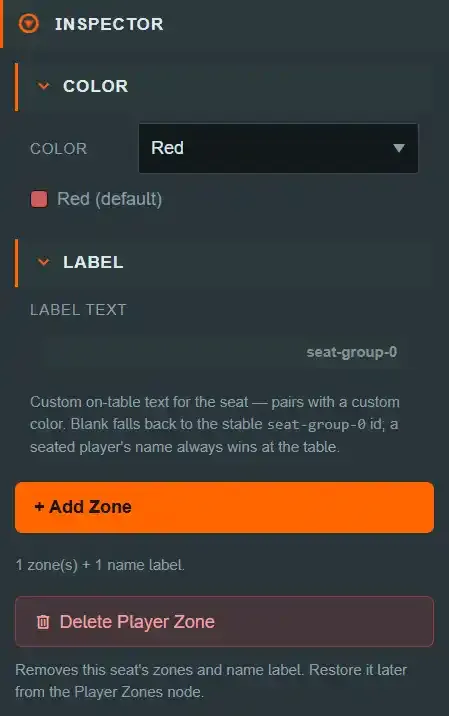
Every seat group has exactly one label — position, box size, rotation Y, font size, and an
optional custom text. Left blank it falls back to the seat's stable id (seat-group-<index>) in
the editor and to the seated player's username at the live table; a seated player's name always
wins there, whatever text you authored.
On a linked seat the label's geometry and its shared text come from the template, so a
per-seat name lives in its own LABEL TEXT override field instead — the shared text would
otherwise be overwritten by the next materialization.
Recoloring a seat#
Select the seat group itself (not a zone or the label) for its Color picker: one of the eight standard colors, or Custom… for an arbitrary hex override. The override tints the zone boxes and the label frame, in the editor and at the table, claimed or not. A zone's type only modulates that colour — it never replaces it, because "whose area is this" is read at a glance far more often than "what kind of zone is this".
Because a recolored or relabeled seat can no longer be identified by its original color name, a
seat's identity is a stable, color-independent id (seat-group-<index>) that never changes.
The #seat-group tag targets every seat group at once; the stable id targets one
forever, however it has been recolored or relabeled.
Seat layout — putting seats back on the table#
Seat positions are derived from the table: its footprint, its ring layout (Edge for a
rectangle, Radial for a round or oval table) and how many seats it declares. Swap the table
and the seats do not follow on their own — a layout you authored is yours, and nothing moves it
without asking. The SEAT LAYOUT block on the Player Zones folder is where you put them back.
It names the table the seats are laid out on, its size, its ring layout and its seat count, so you can see at a glance that a game pinned to a round table still has its seats spread around a rectangle.
There are two strengths, and the difference matters:
| What it does | What it keeps | |
|---|---|---|
| Move seats onto this table's ring | Moves each seat's pivot, its first zone and its name label onto the new ring | Zone sizes, zone types, colours, custom label text, and every zone beyond the first — left exactly where you put them |
| Reset seats to this table's default | Rebuilds each seat as a fresh seat on this table: ring position, rotation, zone size and name-label geometry | Colours, custom label text and each seat's first zone type |
The first appears on its own as a warning whenever the seats stop matching the table — that is the one to take after you resize a table, because your authoring survives it intact.
The second is the one to take when the table changed shape. A hand zone stretched along a rectangle's long edge is still that shape on a circular table, and no amount of moving fixes it. Resetting also clears rotations you set by hand and deletes every zone beyond a seat's first — so it is an explicit action behind a button, never something that happens to you.
Neither touches your objects. A seat's card holders, and anything standing in its zones, stay exactly where they are.
Both show a before/after preview first: a row per seat with its position before and after, what the seat loses, and Apply or Cancel. Cancel is a real answer. Apply is one undo step (Ctrl+Z) — though undoing restores the old layout rather than re-opening the preview.
Seats beyond the table's seat count are removed. A table pack declares how many seats it lays out, and the ring for six seats is not the first six positions of the ring for eight — so lowering the count re-spaces the survivors as well. The preview names every seat it would remove, and a removed seat loses its zones, its label and its colour override.
Snap to table perimeter on a seat group and Apply to… → re-arrange evenly on the template use this same ring, on this same table. One seat or all of them, the answer to "where does this seat go" is the same.
Deleting and restoring a seat#
Delete Player Zone on a seat group removes its zones and label, but the seat slot itself stays available — re-add it later from the Player Zones folder's "Add seat" list, which shows every seat color not currently configured.
Common mistakes#
- Expecting an unclaimed seat's zone to work at the table. It is editor-only visibility by design, and the rules follow the visibility: an unclaimed seat renders nothing and enforces nothing. Not a bug if a zone you placed seems to "disappear" once you leave Edit Mode with nobody seated there.
- Assuming any zone makes something a hand card. Only a
Handzone does. If a discard pile stopped counting toward a player's hand, that is the fix, not a regression. - Expecting a hand zone to hide a face-up card. It does not — use a
Hiddenzone. - Expecting a spectator or a referee to see into a
Hiddenzone. Nobody does. There is no see-all role. - Editing a template-generated card holder in place. The next re-apply recomputes it. Edit the template, or detach that one seat.
- Authoring a template layout with
+Zpointing away from the table. Every seat will face outward.+Zpoints at the table centre. - Renaming a seat's label and expecting it to stick once someone sits down. A claimed seat's label always shows the player's username; your custom text only shows while the seat is empty.
- Swapping the table and expecting the seats to follow. They do not move on their own — open SEAT LAYOUT on the Player Zones folder and either re-derive the ring or reset the seats to the new table's default.
- Looking for a ninth seat. The palette is fixed at eight (
PLAYER_SEAT_OPTIONS) — there is no way to author a ninth color slot.
See also#
- Platform panels — every field on the Player Zones folder, the Seat Template, a seat group and a zone.
- The Hierarchy Panel — the
Seat Templaterow and thelinked/detachedbadges. - Glossary — Seat Template, linked, detached and the zone types, defined once.
- Tags and groups — the
#seat-grouptag and howGROUP EDITcan target every seat at once. - The Scene Model — Folders vs Tag Groups vs Entities.
- Setup JSON —
seatTemplateandseatZonesas they are stored. - Mod scripting API —
TableObjectDefinition.ownerSeatandTableHandState, seats as a mod sees them. - Mod hooks and capabilities —
onSeatChanged, and theonZoneEnter/onZoneLeavehooks these zones raise.