
Entity (Advanced)
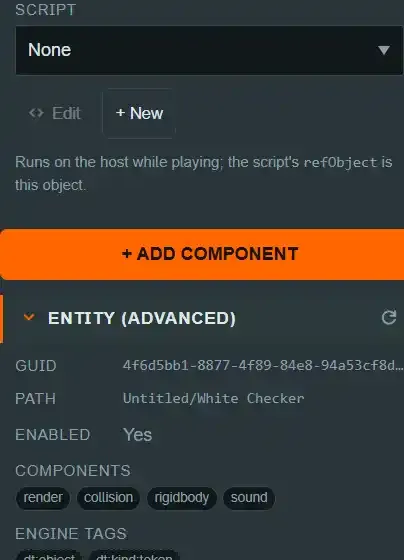
ENTITY (ADVANCED) is the last section in the Inspector's component stack, below + ADD COMPONENT, collapsed by default. It is a read-only window onto the real engine graph —
the Live Entity the runtime actually built —
behind the Scene Entity you are looking at.
Why this exists#
The Hierarchy is an authoring view of the scene document, not the engine's own tree. It
surfaces concepts with no single pc.Entity (Room, Walls, Player Zones, seat groups) and
hides internal entities you must never touch. That is the right primary tree to author from,
but it cannot answer "what does the engine actually have here right now?" — ENTITY (ADVANCED) is the second, bridging view that does, without replacing the first. See Document
vs engine: two hierarchies, bridge don't
unify for the
fuller argument.
What it shows#
Expanding the section (or pressing its refresh icon) resolves the current Live Entity and shows, read-only:
- Guid — the engine's own identifier for this Live Entity.
- Path — its position in the live
pc.Entitytree. - Enabled — the live entity's actual enabled state.
- Components — the real component chips this Live Entity carries (
render,rigidbody,collision, and any optionallight/camerait has), as opposed to what the document says it should have. - Engine tags — the live
pc.Entity.tags, includingdt:internalwhere present. - Local position / rotation / scale.
- Child Live Entities, each rendered recursively (
LiveEntityRow,EngineEntityView.tsx) — the only place a GLB import's sub-entities are visible at all, since the Hierarchy never shows them.
It resolves the entity on demand (when the section is expanded or the selection changes),
never during a tree build — describeEntity walks a subtree of the live graph and is not
something you want re-run on every render.
Guids are unstable — this is the whole reason the view exists this way#
Guids are not stable across snapshot rebuilds.
applySnapshotInternaldestroys and recreates Live Entities whenever the document is applied, so a guid you read here can (and routinely does) change the next time anything edits the scene. This is precisely why the Hierarchy is keyed on the document's stableidrather than on guid — a tree keyed on guid would lose selection, expansion and scroll state on every rebuild.
This instability is the reason the plan chose to bridge the two hierarchies rather than
unify them into one tree. There is no write-back path from a Live Entity into the document
either: nothing here is editable, because anything edited here would be reverted the
next time the document is re-applied (EngineEntityView.tsx).
Show engine entities#
A separate, off-by-default toggle in the Hierarchy — Show engine entities
(TableEditModeShell.tsx) — appends the whole live engine graph as a read-only debug
tree (EngineEntityTree), rather than just the one selected entity's subtree that ENTITY (ADVANCED) shows. It is explicitly not an authoring tree: it is full of debug overlays,
gizmo proxies, ghosts and every sub-node of every imported GLB, and dt:internal entities
are shown dimmed within it rather than hidden, so you can still find one if you need to.
Nothing here is addressable from a script or a mod#
Guids, engine tags, and the live component chips shown in this section are inspection
only. Neither a scene script nor a mod script can address an entity by guid, call
pc.Entity/findByTag, or otherwise reach anything this section displays — a script or mod's
view of the table is the replicated document (via world/refObject for a scene script, or
api for a mod), addressed by id, never by guid. Exposing an engine handle to either
surface would be a sandbox-integrity problem, not a convenience. See IDs, names and
tags for what is addressable, and
why.
See also#
- Document vs engine — why the scene document is the source of truth and the engine is a render artefact rebuilt from it.
- Add Component — the section immediately above this one in the Inspector stack.
- Glossary, Glossary