
Attaching and Running Scripts
This page is about attaching and running Table Scripting inside Edit Mode. For the editor Monaco surface itself — autocomplete, transpile-on-save, the Problems panel — see Item editors: Script. For the language and API, see Scripting API and Scripting concepts.
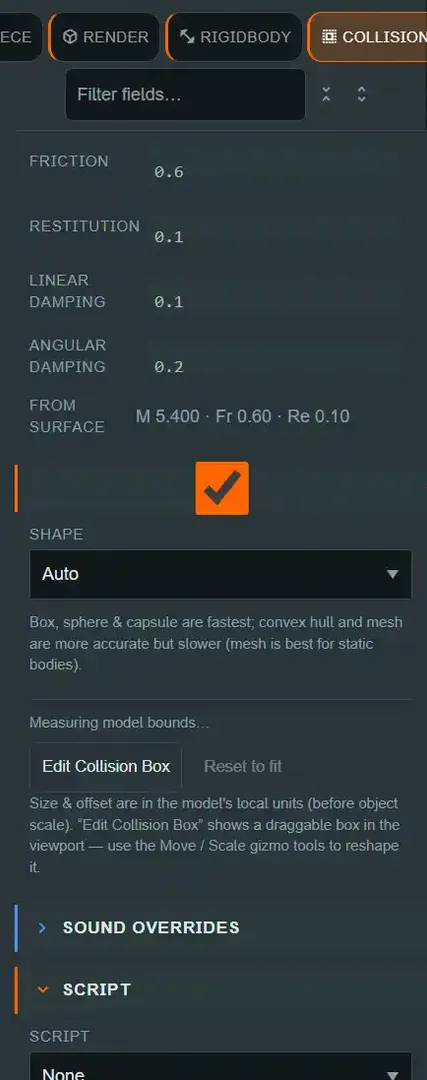
script is not a component — there is one attachment story#
⚠ Unlike light and camera, script was deliberately not migrated into an entity's
components[] array. An entity's script lives on metadata.scriptId
(OBJECT_SCRIPT_METADATA_KEY, packages/shared/src/scripting.ts), with its own dedicated
SCRIPT Inspector section — not the + ADD COMPONENT flow. There is no legacy-vs-current split
to reason about here: this is how a script attaches to an entity, full stop. See
The Scene Model for why "component" is reserved
for engine components and never means this.
Two flavours, and where each one comes from#
Where you press the button decides what you get. The two buttons produce different starter scripts on purpose:
| Created from | Flavour | Starter body | refObject |
|---|---|---|---|
An entity's SCRIPT section (+ New) |
Object script, for that entity's kind | Handlers for the delegates that kind raises | That kind's handle — DeckObject, CardObject, … |
The asset bar or SCENE SCRIPTS (New ▾ ▸ Script) |
Global (scene) script | A globalEvents.onObjectDropped handler |
The generic ObjectHandle |
The kind is recorded on the script itself (SceneScript.refKind), so it survives a save and
still types the editor the next time the script is opened. It is an authoring hint, never a
gate — the host still attaches on metadata.scriptId alone.
Object scripts: one per entity#
Select an entity with a transform and open its SCRIPT Inspector section:
- The Script dropdown lists every project script, with the kind each was written for in
brackets; picking one writes its id to
metadata.scriptId. An entity holds at most one object script. - + New creates a script for this entity's kind — a deck gets a deck starter, a die a die starter — and attaches it in the same action.
- Edit opens the attached script in its own tab (see Item editors: Script).
An object script runs with refObject bound to the entity it's attached to, alongside the usual
world and globalEvents globals. In the editor, refObject is typed for the kind the script
was created for, so a deck script completes on refObject.cards and refObject.onDepleted
while a die script does not offer them at all. Object
Types documents what each kind adds.
Attaching a script to an entity of a different kind is allowed; the section warns, and the script runs exactly as before.
Global (scene) scripts: attached to the scene, not one entity#
Select the Room folder in the Hierarchy and find the SCENE SCRIPTS section. Scene
scripts are attached by id, in a list (sceneScriptIds on the scene document,
packages/shared/src/sceneEditor.ts, capped at SCENE_SCRIPT_MAX_COUNT = 64 total
project scripts) — a scene can carry several at once, unlike the one-per-entity object-script
slot. A scene script runs with world and globalEvents but no refObject — there is no
single entity it belongs to. Use the same Add script dropdown or New ▾ ▸ Script to attach
one; each attached script gets its own row with Edit and a × to detach.
Running scripts in the editor#
The viewport toolbar's Play Scripts button compiles and runs every attached script (object and scene) against the live scene, right inside Edit Mode — no separate preview environment. Starting it automatically switches Frozen to Live, because a script that reads or drives physics needs the simulation actually stepping to do anything useful. Restart re-runs with the latest compiled output and clears session saved-data; Stop halts every running script and leaves the scene as it was.
The Script Console panel above the viewport (auto-shown once anything is running or has
logged) reports diagnostics per script with a timestamp and phase, plus broadcast messages —
this is where a runtime error or a console.log from your script actually surfaces, since
there's no browser devtools access into the sandboxed script host.
Common mistakes#
- Looking for
scriptin+ ADD COMPONENT. It isn't there on purpose — use the dedicatedSCRIPTsection (object) or theSCENE SCRIPTSsection under Room (scene). - Expecting an object script's
refObjectto work in a scene script. It'sundefinedthere — a scene script has no single owning entity. Useworld.getObjectById/world.getAllObjectsinstead. A kind filter narrows the latter, soworld.getAllObjects({ kind: "deck" })gives youDeckObjects with no cast. - Expecting a global script to complete on kind-specific members. It cannot: its
refObjectis the generic handle, because it has no entity. Create the script from the entity'sSCRIPTsection if you want the narrowed typing. - Expecting an entity restored from a snapshot to pick up its object script. An entity
spawned while scripts are running does attach the script its
metadata.scriptIdnames, and itsonCreatedfires — but a table rebuilt from a snapshot raises no creation event, so nothing attaches there. Restart the scripts after a rebuild. See Known limitations. - Forgetting Play Scripts flips Frozen to Live. If pieces you didn't expect start moving the moment you press Play Scripts, that's this, not a bug in your script.
See also#
- Item editors: Script — the Monaco editor, autocomplete, transpile-on-save
- Scripting API
- Scripting concepts
- The Scene Model
ObjectHandle—refObject, the handle an object script is given.- Object Types — the per-kind handle types, and what each adds.