
Add Component
Every Scene Entity carries three intrinsic Engine Components
(RENDER, RIGIDBODY, COLLISION) that are always present. On top of those, an entity can
carry optional components — today, light and camera — added and removed one at a
time from the + ADD COMPONENT button at the bottom of the Inspector's component stack.
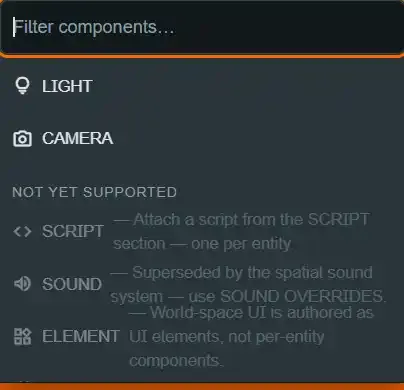
⚠ The addable set is light and camera — not light and script#
If you have read an older description of this feature, correct it here: script is not
addable through + ADD COMPONENT. It never was, and it is not planned to be migrated in.
OBJECT_COMPONENT_TYPES = ["light", "camera"]
(packages/shared/src/objectComponents.ts, OBJECT_COMPONENT_TYPES.) A scene script is
attached a different way — through the entity's own SCRIPT Inspector section, backed by
metadata.scriptId.
There is deliberately one attachment story for scripts, not a "modern components[]"
story competing with a "legacy metadata.scriptId" story. See Table
Scripting for what a scene script can do
once attached.
The components[] array is capped at MAX_OBJECT_COMPONENTS = 8 entries
(objectComponents.ts), with at most one entry per type — a discriminated union rejects a
second light or camera rather than silently overwriting the first.
Where the button lives, and why#
+ ADD COMPONENT is pinned below the component stack — the Unity convention
(ComponentInspector.tsx, AddComponentButton). The stack is variable height, and the
alternative (a button above the transform fields, or interleaved with sections) would shift
the fields you are looking at every time a component is added or removed. Clicking it opens a
popover with a field filter (Filter components…) and two groups:
- Addable —
lightandcamera. A type already on the entity is shown, disabled, with "— already added". - Not yet supported — engine component types the editor describes but cannot author, each shown grayed with its own one-line reason rather than hidden.
I verified this directly against ComponentInspector.tsx's AddComponentButton and
packages/shared/src/componentInspector.ts's unsupportedComponentDescriptors() — the
"shown grayed with a reason" behavior is real, not aspirational. The unsupported group
today is exactly:
| Type | Reason shown |
|---|---|
script |
"Attach a script from the SCRIPT section — one per entity." |
sound |
"Superseded by the spatial sound system — use SOUND OVERRIDES." |
element |
"World-space UI is authored as UI elements, not per-entity components." |
particlesystem |
"No runtime support yet." |
anim |
"No runtime support yet." |
(componentInspector.ts, COMPONENT_INSPECTOR_DESCRIPTORS.) render, rigidbody and
collision do not appear in either group at all — they are intrinsic, always present, and
never offered through this popover. That is why script's entry in the "not yet supported"
group is worth reading
closely: it answers, in the author's own moment of looking for it, exactly the question this
page opened with.
Component sections: enable checkbox, kebab, fields#
Each optional component renders as one collapsible section — the same EmCollapsible
pattern the 15-section material inspector uses. The section header carries:
- An enable checkbox, wired to the component's own
enabledflag (light.enabled,camera.enabled). Disabling keeps the component's settings in the document; it is a flag flip, not a delete. - A kebab menu (
⋮) with Enable/Disable, Reset to default (restores the component's props to schema defaults without touchingenabled), and Remove component…, which asks for confirmation because removing throws the settings away (ComponentInspector.tsx,ComponentKebab).
Intrinsic sections (RENDER, RIGIDBODY, COLLISION) do not get this kebab at all —
there is no Remove action to offer, because intrinsic components are configured and
disabled, never removed. RIGIDBODY and COLLISION do get their own enable checkbox
(physics.rigidbodyEnabled, physics.collisionEnabled); RENDER has none — see Provenance
and lifecycle
for why.
Engine vs Platform accent colors#
Every Inspector section carries an origin — "engine" or "platform" — and the header
accent differs by origin so the distinction reads at a glance, not just in prose:
ENTITY/PIECE/RENDER/RIGIDBODY/COLLISION/SCRIPT/LIGHT/CAMERA are Engine;
PIECE, DIE SETTINGS, SOUND SETS (BUILT-IN) and SOUND OVERRIDES are Platform panels.
This is not decoration — it is the whole point of the terminology work made visible: a
Platform panel is DiceyTable's own classification, not something PlayCanvas ships, and the
two must never be confused for one another.
Camera's three guardrails are behavior, not advice#
Adding a camera component is safe by construction, not by convention — PlayCanvas draws
through every enabled camera and the highest priority wins, so an un-gated second camera
would put every player at the table inside your prop. Three guardrails are enforced in the
runtime, not just recommended in a tooltip:
- Added disabled.
camera.enableddefaults tofalse— the one component type in the whole schema whose default is off (objectComponents.ts, thecameramember ofobjectComponentSchema). - Priority pinned strictly below the table camera. The table camera is priority
0; the runtime clamps an authored camera's priority into1..31on every apply (component.priority = Math.max(1, Math.min(31, Math.round(props.priority) || 1)),TabletopRuntime.ts,applyObjectComponents). An object camera cannot outrank the view players actually play through, however itsPriorityfield is set. - At most one enabled object camera at a time. Enabling a second one is refused — the
runtime forces it back off and logs why (
applyObjectComponents, guarded byloggedCameraConflictsso it logs once): "<label>'s camera stays off — another entity's camera is already enabled."
That log line is written through the same TableEvent path as every other system message
(this.log("System", …)). See the Welding page's caveat
about that path: as of this writing it is not surfaced anywhere in Edit Mode (see that
page's escalation), so today the only confirmation a conflicting camera was rejected is the
component staying visibly disabled after you toggle it — there is no toast or console line to
read while authoring.
The component rail#
Once an entity has ENTITY, PIECE, RENDER, RIGIDBODY, COLLISION, SCRIPT, any
optional components, and its Platform panels, the Inspector is a long scroll. The
component rail — a sticky chip strip pinned to the top of the Inspector body
(ComponentRail.tsx) — is the navigation aid for that:
- Scroll-spy via
IntersectionObserver, deliberately not a scroll handler. The observer watches every section's wrapper and highlights the chip for whichever section's top edge is closest to the panel's own top edge (a tall negative bottomrootMarginis what makes the highlight track reading position rather than lag a screen behind it). A scroll handler would have to recompute this on every scroll event; the observer only fires on actual intersection changes. - Arrow-key navigation. With focus on a chip, ← and → move to the neighboring chip and jump the panel to it — the rail is a real keyboard route, not just a mouse shortcut.
- A field filter, shared with the sections themselves: typing narrows both the visible
chips and the visible sections/fields to matches, so typing "mass" or "bounce" lands
directly on
RIGIDBODYeven though those are field labels, not section titles. - Collapse all / Expand all, for the two extremes of "I want an overview" and "I want to see every value at once."
Each chip carries an origin of "engine", "platform" or "entity"
(ComponentRail.tsx, RailSection.origin) — "entity" is used for the ENTITY header
itself and for ENTITY (ADVANCED), neither of which is a component at all, engine or
platform. The chip strip shows
at most 6 chips inline before folding the rest into an overflow … menu, and a chip for a
disabled optional component renders dimmed.
See also#
- The Scene Model — the Entity/Component vocabulary and the intrinsic/optional split this page assumes.
- Provenance and lifecycle — why Engine and Platform sections get different header accents.
- Entity (Advanced) — the read-only Live Entity
view pinned at the bottom of the stack, below
+ ADD COMPONENT. - Optional component and Intrinsic component — Glossary.
- Mod scripting API —
ObjectComponentState, the two addable components as a mod reads them back.