
The Versions Panel
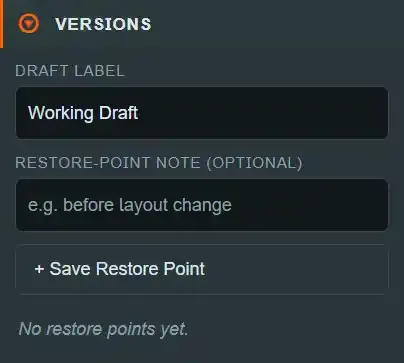
Versions is the bottom panel of the left column. It does two unrelated things that happen
to live together: it holds the editable draft label, and it is where you take and restore
restore points — named server-side snapshots of the whole project.
Restore points are not GitHub commits and not a publish. They are a safety net inside DiceyTable. Publishing is a separate flow.
Draft label#
A plain text field bound to projectNameDraft.
The label is what File ▸ Open Project lists this project
under. It is one of the three things hasUnsavedChanges watches, so editing it turns the
topbar pill to Dirty changes, and it is written by Save Draft along with the scene and
the manifest. It is also part of every undo checkpoint.
It is not the mod's public title — that lives in the manifest and is edited in Mod Details.
Restore-point note (optional)#
A second text field, placeholder e.g. before layout change, disabled until a project is
loaded. Whatever you type here is attached to the next restore point you create, and the
field clears itself afterwards.
Notes are the only human-readable thing distinguishing one restore point from another — versions are numbered, not named. Use it.
+ Save Restore Point#
Disabled while a request is in flight or with no project loaded. Pressing it:
- Saves the draft first if it is dirty. The server refuses to version an unsaved or
invalid draft, so
createRestorePointcallssaveDraft()before doing anything else. - Picks the next free version number. Starting from
v{count + 1}, it counts up until it finds a name not already in the history — so deleting nothing and versioning twice gives youv1,v2, and a gap is never reused. POSTs to/api/editor/projects/{id}/versionswith that version, the trimmed note (or nothing) and your username aspublishedBy.- Clears the note field and reports
Saved restore point v{N}.on the status bar.
On the server the version record captures the artifact hash and a full snapshot of the
draft, and the project's status moves to ready with lastPublishedVersion set to this
version.
Two limits worth knowing:
- A draft that fails validation cannot be versioned. The server rejects it with "Draft must validate before it can be published." Watch the status bar if the button appears to do nothing.
- A project keeps at most 100 version records.
The restore-point list#
With no history, the panel shows No restore points yet.
Otherwise it lists draft.publishHistory newest first. Each entry shows:
| Line | Content |
|---|---|
| Header | The version name in bold, and a Restore button |
| Note | The note you attached, if any |
| Meta | The capture time in your locale, and · {publishedBy} when recorded |
The same list is where publish records land, so a project that has been published shows those entries here too.
Restore#
Restore puts up a browser confirm:
Restore "{version}"? This overwrites the current draft with that restore point.
Accepting POSTs to /api/editor/projects/{id}/versions/{version}/load and then re-runs the
full project load — the same reload described under switching
projects.
⚠ The confirm is the only guard. Restoring replaces the current draft. Anything you have not saved is gone, and so is anything you have saved since the restore point was taken — a restore is not itself undoable from the undo stack, because the reload resets the editing session. Take a restore point before restoring an old one if you are not sure.
The step-by-step version of this, including when to take restore points, is Save, version and restore.
What the panel writes#
| Control | Written where |
|---|---|
| Draft label | The in-memory draft; the server on Save Draft |
| Note field | Nothing until a restore point is created |
+ Save Restore Point |
Saves the draft, then appends a version record and a full snapshot on the server |
Restore |
Replaces the server draft with the chosen snapshot, then reloads the project |