
Plain File Editor
Double-click any text file in the asset explorer — manifest.json, a mod's entry.js,
a README.md, .deck.json before you generate a deck from it — and it opens in a plain
Monaco text editor.
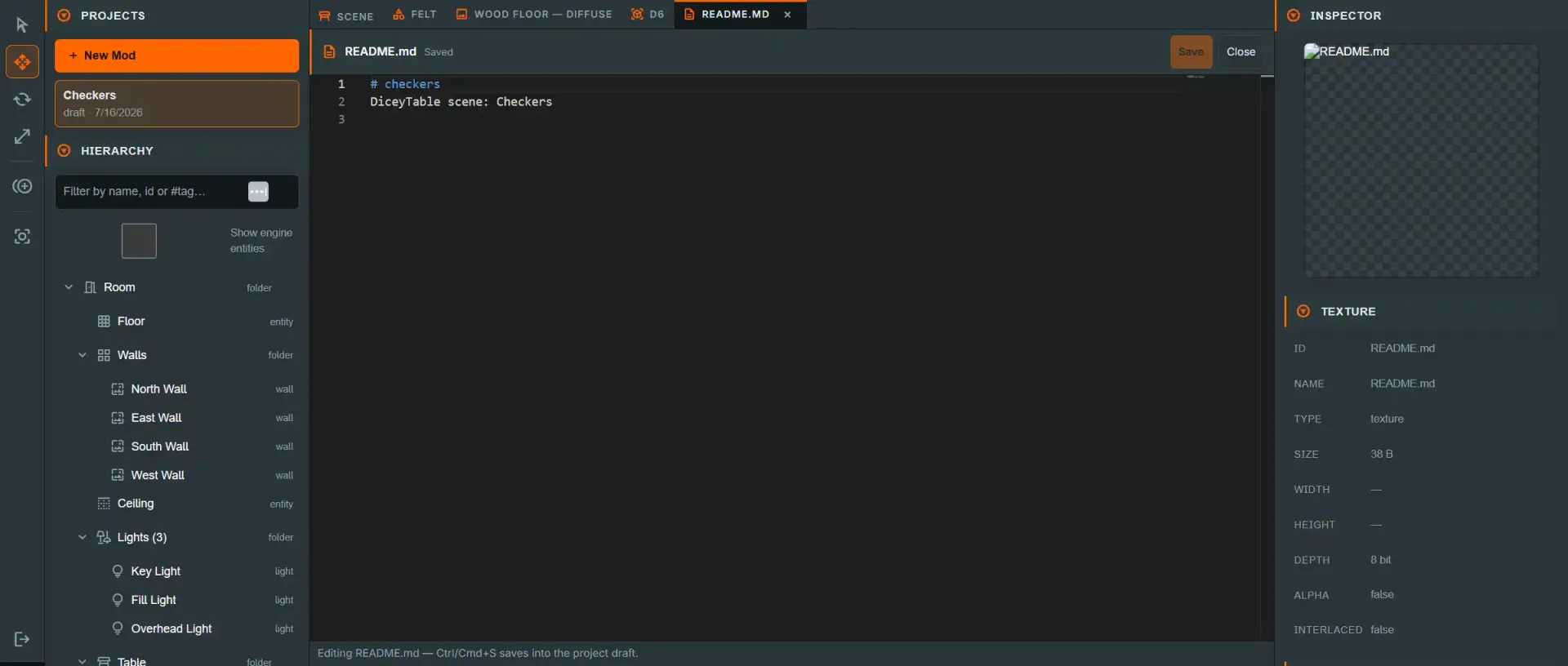
See the tab strip conventions — dirty dots, closing, cycling and mounted-but-hidden tabs apply here too, including the same unsaved-changes confirm on close that the script editor uses.
How this differs from the script editor#
This is not the same editor as Table Scripting,
even though both are Monaco. A scene script is an object stored inline in the scene
document, keyed by a UUID, transpiled to JavaScript on save. A plain file is whatever
sits at a repo-relative path in your project's file tree — its tab id is that path —
read and written straight through the same byte-writing path the texture editor uses
(replaceAssetBytes), with no DiceyTable-specific compilation step. Saving a .ts
or .js file here writes exactly the text you typed; nothing transpiles it, and nothing
checks it against the Table Scripting API's types.
What opens as text#
Only file extensions the editor recognizes as text open here — everything else (images,
models, .deck.json's companion sheet, etc.) opens in its own dedicated tab kind
instead. The recognized set, with syntax highlighting per language:
| Extensions | Language |
|---|---|
.ts, .mts, .cts, .tsx |
TypeScript |
.js, .mjs, .cjs, .jsx |
JavaScript |
.json, .jsonc |
JSON |
.md, .markdown |
Markdown |
.css |
CSS |
.html, .htm |
HTML |
.xml, .svg |
XML |
.yml, .yaml |
YAML |
.glsl, .vert, .frag, .txt, .gitignore, .gitattributes |
plain text |
Three generated files#
diceytable.mod.json, setup.json and README.md are generated, not sources. The editor
rewrites the first two from the draft on every Save Draft and regenerates the README from your
manifest on every publish, and publishing deliberately ignores the copies in the file tree in
favour of the generated text — so an edit made here would be accepted, reported as saved, and
then silently thrown away.
diceytable.mod.json does not open here at all. Double-clicking it opens the
manifest editor — the same tabbed form
Mod ▸ Mod Details… opens — which edits the manifest as a form and shows the JSON itself,
read-only, on its File tab.
setup.json and README.md open here read-only, with a line under the editor naming the surface
that does own the file: the viewport / Hierarchy / Inspector for setup.json, and Mod Details
for README.md (its name, type, category and description). Everything else in the tree,
scripts/*.js included, is genuinely editable here. See The Publish Flow
for what the generated README contains.
Saving#
Ctrl/Cmd+S or the Save button writes the edited text back to the draft
filesystem at this file's path, using a content type derived from its extension (so a
.json file is written back as application/json, a .md file as text/markdown, and
so on — matching what the asset explorer itself assumes when it lists the file). A save
here is a normal draft-filesystem write: it refreshes the explorer thumbnail/listing
immediately, and reaches your GitHub repository the next time you checkpoint or publish,
exactly like any other asset edit.
There is no compile step to fail — the only save error you'll see is a write failure (for example, the 180-character path limit).