
The Hierarchy Panel
The Hierarchy is the middle panel of the left column and the main way you select things. It
is an authoring view of the scene document, keyed by id — not the PlayCanvas scene
graph. That distinction has consequences, and they are explained on Document vs
engine.
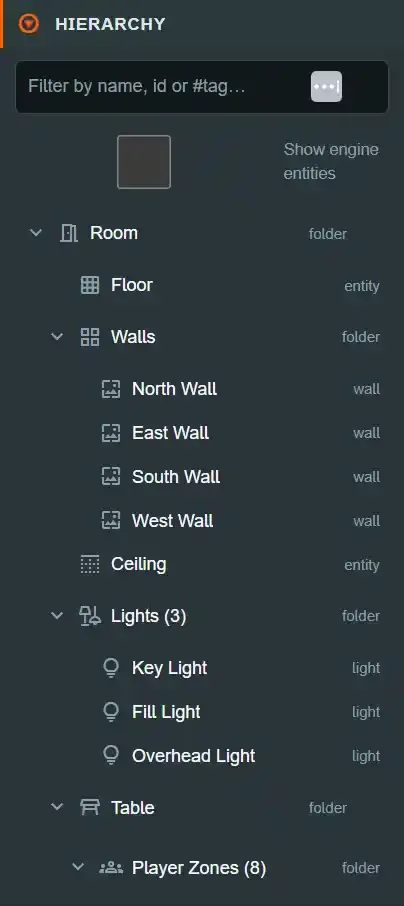
Top to bottom the panel holds: a filter box, the tag pills, the Show engine entities
toggle, the tree itself, and — when that toggle is on — a second, read-only engine tree.
The tree#
The tree is built by buildSceneNodes and rendered by SceneTree. It always has the same
skeleton:
Game               (dice — see the Inspector's Game panel)
Room
├─ Floor
├─ Walls
│  └─ North Wall … (posters nest under their wall)
├─ Ceiling
├─ Lights (N)
│  └─ Key Light …
└─ Table
   ├─ Player Zones (N)
   │  ├─ Seat Template …   (a name label, zones and card-holder definitions)
   │  └─ seat-group-0 …    (zones and a name label — detached seats only)
   ├─ Entities (N)
   │  └─ your entities, nested by parent
   └─ Snap Points (N)
      ├─ Board (64) …     (a grid, with its generated points inside)
      └─ Discard …        (points placed one at a time)
Each row shows an icon, an optional color swatch, the row's name, and a TYPE token at the
right. The token is not always the row's internal kind: grouping rows report folder,
seat groups report tag group, and an entity reports entity. A typed seat zone reports its
zone type (hand, area, hidden, scripting, …) instead of seat-zone, and a template's
card-holder row reports the kind it will generate. The mapping and the reason for it are on
The scene model.
Three details worth knowing:
Entities (N)counts every entity in the scene, not just the un-parented ones. Parenting something must not change the answer to "how many entities are here?".- Rows show the human name. The label is
objectDisplayName()—displayNameif set, otherwise the slug. See IDs, names and tags. - A broken parent link still renders. An entity whose
parentIdis dangling, self-referential or part of a cycle is drawn as a root row rather than disappearing. Showing it in the wrong place beats hiding it. (Both load paths prune such links on the next load.)
The tree changes shape in a purpose-built editor#
The skeleton above is what plain /editor shows. Each
editor mode assembles a different tree
rather than filtering this one — which is why a mode can promote a row to the top level, not
just hide it.
The Game Editor (/editor/game/{id}) is the clearest example. A game is composition: it
picks a room and a table and lays out seating and entities. It does not edit a wall. So Room
and Table collapse to two assignable leaf rows, and the two folders that used to nest
under Table are promoted to the top level:
Game          Dice, players, debug overlays and scene scripts
Room          Noir Parlour 1.2.0
Table         Hex Wargame 2.0.1
Player Zones (8)
├─ Seat Template …
└─ seat-group-0 …
Entities (14)
└─ your entities, nested by parent
Snap Points (64)
└─ Board (64) …
Six rows instead of nineteen, and none of the twelve scenery rows a game author cannot meaningfully edit there.
Game is where the game-wide settings live. Clicking Room here opens the assign
inspector rather than plain /editor's Room settings, so the settings that are about the game
as a whole moved to their own row: Dice, Debug Visibility, Game Settings (player
counts) and Scene Scripts. See the Game panel.
Plain /editor has the Game row too, but there it carries only Dice. Its Room row still
holds the other three. The promotion is the load-bearing part: collapsing Table by filtering
would have taken Player Zones and Entities down with it.
The subtitle carries the assigned pack and its pinned version, and it is also where a problem with that pin becomes visible:
| Row reads | Means |
|---|---|
Room (built-in) (greyed) |
No pack assigned — the stock look, which is a normal state, not an empty slot |
Room Noir Parlour 1.2.0 |
Pinned to that exact version |
Room Noir Parlour 1.2.0 · 1.3.0 available |
A newer version exists. It is an offer; nothing updates itself |
Room com.mattb.noir-parlour 1.2.0 unavailable |
No published pack answers to that id any more. The pin is kept — nothing was changed for you |
Room com.mattb.noir-parlour 1.2.0 (no name, no badge) |
The registry could not be read, so the pin was never checked. The inspector says so and offers Try again — this is not the unavailable case, and nothing is claimed about the pin |
Clicking either row opens its assign inspector.
Nothing is migrated and nothing is destroyed. A scene with hand-edited room internals — extra lights, posters, a moved wall — keeps every byte when you open it in the Game Editor. Only the rows are hidden, and the Room Editor is the way back to them.
The other three editors do the mirror of this. The Room Editor drops the table spine entirely and groups everything a room pack owns under three rows:
Room                       (the shell, and the props in it)
├─ Floor
│  └─ Openings (0)
├─ Walls
│  └─ North Wall
│     ├─ Openings (1)      (a window belongs to the wall it is cut into)
│     └─ posters …
├─ Ceiling
│  └─ Openings (1)
└─ Decor (N)
Lights (N)
├─ Key Light …
└─ Old Chapel (2)          (lights found inside a scenery model)
Environment                (sky, fog, the ground outside)
└─ Environment Scenery (N)
Three things there are worth stating plainly, because each replaced an earlier arrangement:
- Openings live under the surface they pierce. Each of the floor, the ceiling and the four
walls carries its own
Openings (N)folder, and the folder is rendered even when it is empty. A hole's coordinates are in its surface's basis and its size is bounded by that surface's extent, so filing them all in one room-wide folder made you choose the surface twice — once to find the wall, and again in a dropdown. - The
Roomrow owns the whole shell, includingDecor, and its inspector carries the global show/hide switches for floor, walls and ceiling. Hiding the built-in box so your own model can be the room used to take six visits to six panels. Environment Sceneryis a child ofEnvironment. The sky, the ground outside and the buildings standing on it are one subject at two distances.
Lights stays at the top level, because it is the one thing that belongs to both the room and
the world outside it.
The Table Editor shows Model, Colliders (N), Triggers (N), Play Surface
and Seat Ring under one Table row; and the Asset Editor
shows Prefabs (N), Decks (N), Materials, Textures and Scripts — pieces, with no room,
no table, no player zones and no seat template, because an Asset pack owns none of those.
Rows in the Asset Editor carry a badge when the published document would refuse them: a
prefab bound to a script the pack does not ship reads missing script, a script attached to no
prefab reads orphan, and a deck that does not ride inside the document reads not bundled.
They are shown and named rather than dropped — a refusal first met at publish time has already
spent an immutable version.
The Seat Template row#
Player Zones sorts one Seat Template row first, above the seat groups, and renders it
whether or not a template exists — an author has to be able to see that the concept exists
before they have used it. With none defined it reads "Seat Template — not defined" and is
greyed; with one it carries TYPE token template and holds the template's name label, its
seat-local zones and its card-holder definitions (not the entities those generate — those
are real Scene Entities and live under Entities (N) like anything else).
It is not a seat: no color swatch, never claimable, and its rows carry their own kinds so
nothing keyed on a real seat's world transform can reach them. Its stableId is seat-template,
so the filter finds it by name or by that id.
Each seat group then carries a linked or detached badge — but only when a template
exists. With no template every seat is detached by definition, and badging all eight would be
noise rather than information, so a template-less scene renders exactly the tree it always did.
A linked seat renders no children. Its zones and label are the template's, so there is
nothing seat-specific to select, and eight linked seats would otherwise produce ~32
near-duplicate rows all saying the same thing. Select the seat group itself to reach its group
transform, color and label-text override; select the Seat Template row to edit the geometry.
A detached seat shows its zones and label exactly as before.
See Player Zones and seat templates for what linking means, and Platform panels for the fields on each row.
The Snap Points folder#
Snap Points (N) is a sibling of Entities, never a child of it. A snap point is a
placement rule the table owns — it is what decides where a dropped piece lands — and it is
not a Scene Entity. Its TYPE token reads snap grid or snap point accordingly, never
entity and never component.
The folder has two kinds of child:
- A grid (
snap grid) is an authored block: a centre, a row and column count, a spacing per axis, a yaw and a radius. Its label carries how many points it generates, and those points are nested inside it — they belong to the grid, so deleting the grid row deletes them with it. - A point (
snap point) directly in the folder was placed on its own with the snap-point tool.
Selecting either attaches the transform gizmos, the same ones every other selection uses:
| Gizmo | On a point | On a grid |
|---|---|---|
| Move | its position | the grid's centre |
| Rotate | the facing a snapped piece is turned to | the yaw of the whole block |
| Scale | its snap radius | the two cell spacings |
Scale on a grid moves the cells apart; it never adds or removes one. Rows and columns are typed in the Inspector, so a drag cannot quietly change how many points a grid generates.
A generated point's geometry is read-only, and its panel says which grid owns it. Its
position, facing and radius come from the grid's layout, so an edit here would be discarded
by the next regeneration. Its name is editable, because generation preserves labels on
purpose — that is how a chessboard's squares come to be called a1.
Snap radius is the catchment a dropped piece is pulled into, and it is the one number both the drop rule and the viewport read. Turn on Show radii in the snap-point flyout to see it drawn as a disc on the table while you work.
A grid whose authored rows × columns exceeds the 1000 points a grid may generate is badged
truncated rather than silently shown at its real size — the same rule the Table Editor's
collider rows follow.
Scripts read a point's name with
world.getSnapPointAt, which is how a move
log prints "Matt moved White Pawn from e2 to e4".
Lights that came in inside a model#
A GLB can carry lights, and a building model routinely does. When you place one as environment
scenery, any lights inside it appear in Lights under a folder named after the placement, with
the TYPE token model light rather than light.
They are not the same thing as a light you added. The model owns where they are; the document records only your overrides — on/off, colour, intensity, range and shadow casting — so re-importing the model keeps your settings and moving the lamp in the model moves the light. There is no position field and no Delete, for the same reason.
Shadow casting is off by default whatever the model says. Shadow views are the number that can refuse a publish, so a light inside imported scenery has to be asked for one explicitly. The Lights folder shows the room's budget.
Expansion#
Room, Table, Walls, Lights, Environment, Player Zones, Seat Template,
Snap Points and Entities start
expanded — a collapsed template row would leave Player Zones looking like it holds no geometry
at all once its seats are linked. So does
any entity row that has children — an entity only has children when something is
parented to it, and collapsing those by default made parenting look like deletion.
Everything else starts collapsed. Your manual toggles are per-row and last for the session.
The filter#
An input with the placeholder Filter by name, id or #tag…. Escape inside the box clears
it; a × button appears next to it while any filter is active.
What it matches, per sceneNodeMatchesNeedle — all case-insensitive substring matches:
| Matched | Example |
|---|---|
| The row's displayed name | chess |
The entity id |
a fragment of the id |
The row's stableId, where it has one |
seat-group-0 |
| Any of the row's tags | hero |
What it deliberately does not match: the subtitle. Subtitles embed positions, sizes,
counts and intensities, so substring-matching them would make short or numeric queries hit
almost every row — typing 0 would "match" the whole tree. Everything addressable that a
subtitle used to advertise is now carried structurally in stableId and tags, so nothing
findable was lost.
The #tag form#
A leading # narrows the query to tags only. #seat-group selects every row carrying
that tag and nothing else. A bare # while you are still typing filters nothing.
How filtering shapes the tree#
- A row is kept if it matches or any of its descendants match, so the path to a match stays visible.
- A kept group's children are themselves filtered — you do not get a matching folder's entire contents back.
- An empty query filters nothing.
- While any filter is active the tree force-expands, so a match nested six levels down is visible without clicking.
- If nothing matches, the tree is replaced by
No matches.
The tag pills#
Below the filter, one pill per author tag present anywhere in the scene, sorted alphabetically, each showing the number of entities carrying it. Clicking a pill toggles it.
- Multiple pills are ANDed. Clicking
herothenblueshows blue heroes, not everything blue or heroic. The pills are a narrowing tool. - A
clearpill appears once at least one is active. - A pill whose tag no longer exists anywhere — you deleted or untagged the last entity carrying it — is dropped automatically, so the tree can never filter down to nothing with no visible cause.
- The pill list is built from authored tags. Reserved
dt:platform tags are not authorable and never appear as pills; they show as dimmed, non-removable chips in the Inspector'sTAGSfield. See thedt:namespace.
Active pills also feed the Inspector's GROUP EDIT panel, which can scope a bulk edit to
"everything tagged this". Tag authoring and bulk tag operations are covered in Tags and
groups.
Row controls: eye and lock#
Each row can carry up to two icon buttons on its right-hand side.
The eye — visibility#
Shown on entity rows always, and on a group row whenever its subtree contains at least one entity. Toggling a group's eye acts on every entity in its subtree, and the group's eye reads "off" only when every one of them is hidden.
Hiding writes metadata.enabled = false on each affected entity and pushes the change to
the runtime live, without re-applying the whole scene. It is the same flag as the
Inspector's ENTITY → Enabled checkbox, and per PlayCanvas semantics disabling an entity
disables everything on it.
The lock — protect from editing#
Shown on entity rows only. It writes the real schema field locked and is pushed live:
a locked entity gets a static body, and the runtime's gizmo and selection guards refuse to
drag it. A locked row keeps its icon permanently visible so locked entities scan at a
glance.
Selection#
- Click selects the row and makes it the Inspector's target.
Ctrl/Cmd+click adds or removes an entity row from the multi-selection.Shift+click selects the range between the anchor row and the clicked row, in visible order.
Modifier clicks mean nothing on folder and seat-group rows — only entity rows join a multi-selection, because folders and seat groups have no shared bulk operation. Dropping the primary selection promotes another member, so the Inspector never goes blank while rows are still selected.
Dragging an entity row onto another entity parents it; dragging onto the Entities folder
detaches it to the root. A row that is part of the multi-selection drags the whole
selection. The drop target renders differently for a legal and an illegal target, and a
rejected drop reports its reason rather than silently doing nothing.
Both of those are their own topic: Multi-select and Parenting.
The context menu#
Right-clicking a row selects it first, then opens a menu at the pointer. It closes on
Escape or on any pointer-down outside it, keeps itself inside the viewport near an edge,
focuses its first enabled item on open, and supports ArrowUp/ArrowDown. Its header shows
the row's name, with the row's id as the tooltip.
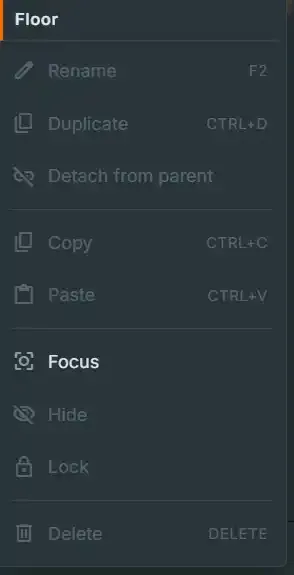
The item list depends on what you right-clicked.
Entity rows (and lights and posters)#
| Item | Shortcut | Enabled when |
|---|---|---|
| Rename | F2 |
Entity, light or poster — anything with a name field. Focuses and selects the Inspector's name field. |
| Duplicate | Ctrl+D |
Entity rows |
| Detach from parent | — | Entity rows that have a parent |
| Copy | Ctrl+C |
Entity rows |
| Paste | Ctrl+V |
Entity rows, when the clipboard holds something |
| Focus | — | Always |
| Hide / Show | — | Entity rows; label flips with current state |
| Lock / Unlock | — | Entity rows; label flips with current state |
| Delete | Delete |
Deletable kinds only |
Detach from parent is always non-destructive: the entity keeps its own authored physics, and the parent keeps its other children.
Focusdoes not move the camera. It calls the runtime'sselectObject, which re-asserts selection, glow and gizmo. Camera framing is not implemented behind this item. This is reported as a bug — see the same note on the transform rail.
Seat-group rows#
Add Zone · Focus · Delete Player Zone — the last deletes the whole seat, every zone
plus its name label, behind a confirmation.
Seat-zone and seat-label rows#
Focus · Delete.
Seat-template rows#
The Seat Template row and its children fall through to the generic menu with only Focus
enabled. A template's zones and card-holder definitions are deleted from the Inspector
(Delete Zone, Delete Card Holder) rather than from the tree, because deleting a template
holder also removes the entities it generated on every linked seat — a consequence the tree row
cannot show you.
What is deletable#
isDeletableKind allows exactly: entities, seat zones, whole seat groups, room lights and
posters. Room, Table, the folders, surfaces, walls, seat labels and every seat-template row are
structural and cannot be deleted here.
Show engine entities#
A checkbox above the tree: "Show the live PlayCanvas entity graph (read-only debug view)."
Turning it on appends a second tree below the authoring tree, showing the real
pc.Entity graph with a refresh control. It is off by default and persisted per user in
localStorage under diceytable.editor.showEngineEntities.
It is deliberately kept out of the authoring tree: the engine graph is full of internal entities, explodes an imported model into dozens of rows, and its guids change on every rebuild. Nothing in it is addressable from a scene script or a mod.
The per-entity equivalent is the Inspector's read-only ENTITY (ADVANCED) section —
Entity (Advanced).
What the Hierarchy writes#
| Control | Written where |
|---|---|
| Filter, tag pills, expansion | Nothing — view state only |
Show engine entities |
localStorage only |
| Eye | metadata.enabled on each affected entity, plus a live runtime push |
| Lock | locked on the entity, plus a live runtime push |
| Drag to reparent | parentId, via a reparent intent |
| Context menu | Depends on the item — rename, duplicate, delete, detach, hide, lock all write the document |