
The Inspector Panel
The Inspector is the right-hand column of Edit Mode
(<div className="em-side em-side-right"> → <Panel headerText="Inspector" collapsible class="em-panel"> in TableEditModeShell.tsx). This page is about the region: where it
sits, what drives what it shows, and its resize handle. The fields it draws, section by
section, are a separate reference — The Inspector is the map for
that, with one page per section and per node kind.
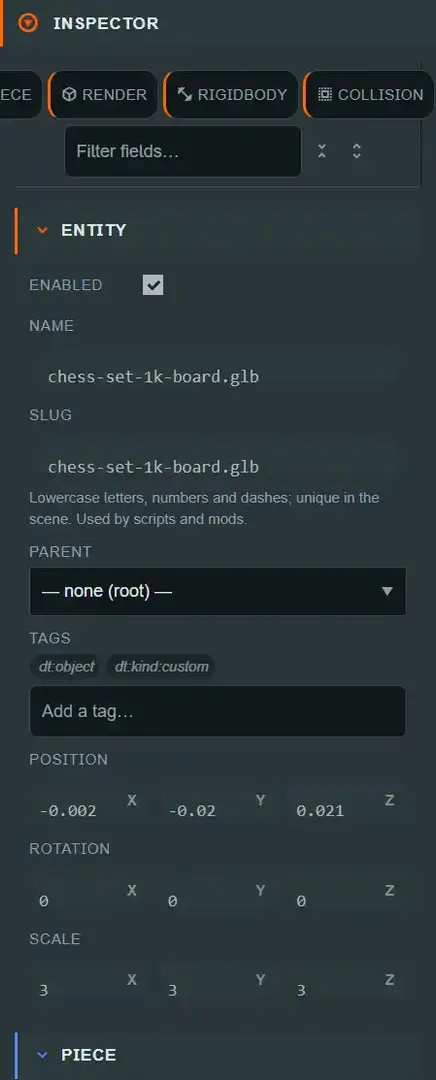
What it shows: whatever is selected, and only that#
The panel body renders exactly one thing at a time — the fields for whatever selectedNode
currently is. There is no default content and no "nothing selected" placeholder beyond a
prompt (Select an item in the hierarchy.); the Inspector never shows two selections' fields
side by side, and it never shows stale fields for something you have since deselected.
Selection can come from any of three places, and all three land in the same selectedNode
state, so the Inspector updates identically regardless of where the click happened:
- A row in the Hierarchy.
- A tile in the asset explorer (a texture or a material — clicking a model, script or deck tile opens it as a tab instead of selecting it here).
- An entity clicked, or a group box-selected, directly on the stage, which also mirrors the selection back into the Hierarchy.
Multi-select layers on top, not instead#
Selecting more than one entity (Ctrl/Cmd+click or Shift+click in the Hierarchy, or
Ctrl/Cmd+click or a dragged box on the stage) does not replace the Inspector's normal content — the
primary selection still renders its usual sections, and a SELECTION (N) panel is appended
below them. That panel carries the bulk actions and the Scale gizmo mode for multi-entity
scale drags. See Multi-select for what it can do.
The resize separator#
A drag handle (role="separator", labeled Resize inspector panel) sits on the Inspector's
leading edge, between it and the stage — dragging left grows the panel. It shares the same
pointer-capture mechanism, clamped range (200–520 px) and per-user localStorage persistence
as the other two panel separators; the full mechanics are documented once, on
the viewport's panel-layout
section, rather than
repeated here.
The handle — and the whole three-column resizable layout — only renders at a window width of 980 px or more; narrower windows fall back to the stylesheet's responsive layout.
Where the field reference lives#
This page stops here on purpose. What each section is, which are Engine components versus Platform panels, and every field's type/range/default/runtime-effect is The Inspector and the pages linked from its node-kind table — entity, piece, render, rigidbody, collision, light, camera, script, platform-panels and materials-and-textures.
What the Inspector panel itself writes#
| Control | Written where |
|---|---|
| Selecting something | Nothing — selectedNode is view state |
| Any field inside a section | Whatever that field documents on its own page |
| Resize separator | localStorage only |
See also#
- The Inspector — the field-by-field map, and the Engine-vs-Platform accent-color distinction.
- The Hierarchy Panel — the most common way to change the selection.
- The Viewport — the stage selection path and the shared panel-resize mechanics.