Material and Texture Fields
Field-by-field reference for the two asset-inspector kinds: a material
selection and a texture selection. Both are Project
Definitions — not engine
components and not Platform panels — so neither carries the tone="engine"/tone="platform"
accent the object Inspector's sections do. How to assign a material or texture, and the
built-in-vs-project/"editing copies itself" workflow, is Working with
materials and Working with
textures; this page only documents the fields themselves.
Verified section count: 15, exact match#
The plan estimated 15 material sections. Walking MATERIAL_INSPECTOR_SECTIONS in
packages/shared/src/sceneEditor.ts directly: exactly 15 sections — Texture Transform,
Ambient, Diffuse, Specular, Emissive, Opacity, Normals, Parallax, Clearcoat, Sheen,
Refraction, Iridescence, Environment, Lightmap, Other, in that order, matching PlayCanvas's
own StandardMaterial inspector layout. The array itself carries a comment recording the same
count, and sceneEditor.test.ts asserts it. No discrepancy to report here.
The Material Inspector#
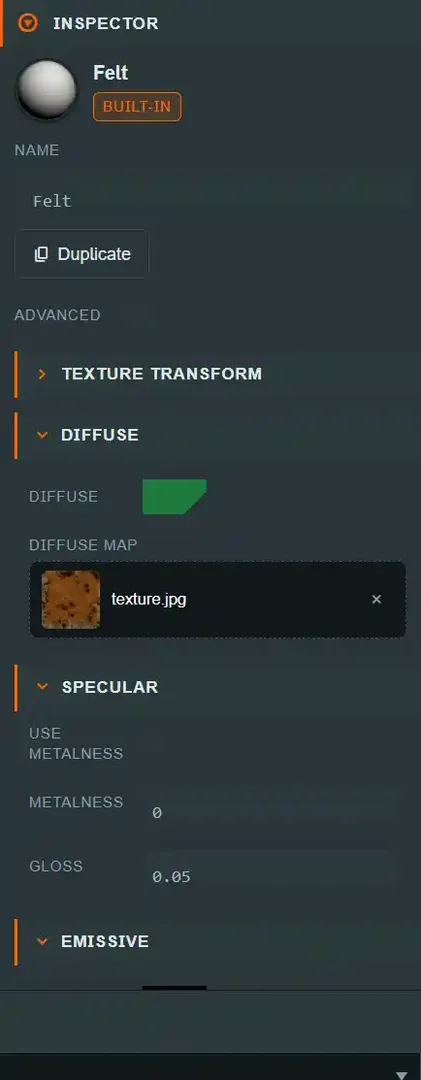
Selecting a material (project or built-in) renders MaterialInspector
(apps/web/src/ui/editor/MaterialInspector.tsx) — the Advanced toggle, then the 15
sections, each a collapsible built from the shared MATERIAL_INSPECTOR_SECTIONS descriptor so
the scene Inspector and the Material editor tab render
identically from one source. Every field maps ~1:1 onto a pc.StandardMaterial property.
Advanced#
| Field |
Type |
Default |
Runtime effect |
Replicates |
| Advanced |
boolean |
false |
Reveals every section marked advanced below in full, and the individually-advanced-marked fields inside otherwise-basic sections (see each table). Persisted in localStorage under diceytable.editor.materialAdvanced — browser-wide, not scoped per user the way the panel layout and undo history are. |
n/a — pure UI state, not part of the document |
Four sections — Diffuse, Specular, Emissive, Opacity — start expanded; every
other section starts collapsed, regardless of Advanced mode.
What every field row means#
Every material field lives on SceneMaterial.props (MaterialProps in sceneEditor.ts), a
Project Definition. It is not
TableObjectState, so it is not covered by objectStateEq; an object references a material
only by id (metadata.materialId), and that reference — not the material's own props —
is what's threaded through the per-object replication system. Below, Replicates always
means "part of the scene document's material list," not "a per-object delta field."
Texture Transform
| Field |
Type |
Range / units |
Default |
Runtime effect |
| Tiling X |
number |
unbounded, step 0.1 |
1 |
Horizontal UV repeat multiplier across every texture map on this material. |
| Tiling Y |
number |
unbounded, step 0.1 |
1 |
Vertical UV repeat multiplier. |
| Offset X |
number |
unbounded, step 0.1 |
0 |
Horizontal UV offset. |
| Offset Y |
number |
unbounded, step 0.1 |
0 |
Vertical UV offset. |
All four apply to every map slot on the material at once, not just the diffuse map.
These four fields are a recolouring tool, not just a tiling knob. When a model's texture
is a palette atlas — a grid of flat colour swatches that the mesh's UVs pick one cell from
— shifting Offset X/Y moves which cell the whole model samples, and so changes its colour
without touching the mesh or the texture. The bundled KayKit materials
(KayKit Blue, KayKit Red, KayKit Gold, …) are exactly this: sixteen materials that
differ only in their offset into one shared 35 KB atlas. Assign a different one to a KayKit
piece and it changes colour at zero download cost. See
Working with materials.
Ambient — Advanced section
| Field |
Type |
Range / units |
Default |
Runtime effect |
| Ambient |
color |
hex #rrggbb |
#ffffff |
Tint applied to ambient/indirect light on this material, before any AO map is factored in. |
| AO Map |
texture slot |
any project/built-in texture |
none |
Ambient-occlusion map — darkens ambient contribution in occluded crevices. |
| Tint |
boolean |
— |
false |
Whether the Ambient color actually multiplies the AO map, versus the map being used alone. |
Diffuse
| Field |
Type |
Range / units |
Default |
Runtime effect |
| Diffuse |
color |
hex #rrggbb |
#ffffff |
The material's base/albedo color. |
| Diffuse Map |
texture slot |
any project/built-in texture |
none |
Base color texture, multiplied by Diffuse when Tint (below) is on. |
| Tint (Advanced) |
boolean |
— |
true |
Whether the Diffuse color multiplies the Diffuse Map, or the map is used at full strength alone. |
| Vertex Color (Advanced) |
boolean |
— |
false |
Multiplies in per-vertex mesh color data, when the mesh carries any. |
Specular
| Field |
Type |
Range / units |
Default |
Runtime effect |
| Use Metalness |
boolean |
— |
true |
Selects the metalness/roughness PBR workflow over the legacy specular-color workflow. |
| Metalness |
slider |
0–1, step 0.01 |
0 |
How metallic the surface is — 0 fully dielectric (plastic, wood, cloth), 1 fully metal. Multiplies the Metalness Map when one is set. |
| Metalness Map (Advanced) |
texture slot |
any project/built-in texture |
none |
Per-pixel metalness, read from a single channel (see Metalness Channel). |
| Metalness Channel (Advanced) |
select |
R / G / B / A |
B |
Which channel of the Metalness Map holds metalness. Defaults to blue because glTF packs it there. |
| Gloss |
slider |
0–1, step 0.01 |
0.5 |
Surface smoothness — higher is a tighter, sharper specular highlight. Multiplies the Gloss Map when one is set. Means roughness instead when Gloss Is Roughness is on. |
| Specular (Advanced) |
color |
hex #rrggbb |
#ffffff |
Specular reflectance tint, used by the legacy (non-metalness) workflow. |
| Specular Map (Advanced) |
texture slot |
any project/built-in texture |
none |
Per-pixel specular tint, legacy workflow. |
| Gloss Map (Advanced) |
texture slot |
any project/built-in texture |
none |
Per-pixel gloss/roughness, read from a single channel (see Gloss Channel). |
| Gloss Channel (Advanced) |
select |
R / G / B / A |
G |
Which channel of the Gloss Map holds the value. Defaults to green because glTF packs roughness there. |
| Gloss Is Roughness (Advanced) |
boolean |
— |
false |
Inverts gloss, so Gloss and the Gloss Map are read as roughness — 0 mirror-smooth, 1 fully matte. Turn this on for any map authored as a roughness map. |
| Specularity Factor (Advanced) |
slider |
0–1, step 0.01 |
1 |
Overall strength multiplier on the specular response. |
Wiring a glTF metallic-roughness texture
glTF (and therefore every .glb/.gltf model) packs metalness in blue and roughness in
green of one image. To reproduce that exactly, assign the same texture to both
Metalness Map and Gloss Map, leave the two channel selectors at their defaults
(B and G), and turn Gloss Is Roughness on.
The order matters: the renderer multiplies the scalar by the sampled channel and then
inverts, so Gloss must hold the raw roughness factor — not 1 − roughness. Wiring the
map without Gloss Is Roughness reads roughness as gloss, which makes matte surfaces
shiny and shiny surfaces matte.
Materials extracted from a built-in model are already wired this way.
Emissive
| Field |
Type |
Range / units |
Default |
Runtime effect |
| Emissive |
color |
hex #rrggbb |
#000000 |
Self-lit color, added on top of lighting — visible even with no light on the surface. |
| Intensity |
slider |
0–10, step 0.1 |
0 |
Multiplier on the Emissive color; 0 means no self-illumination regardless of the color set. |
| Emissive Map (Advanced) |
texture slot |
any project/built-in texture |
none |
Per-pixel emissive mask/color. |
Opacity
| Field |
Type |
Range / units |
Default |
Runtime effect |
| Opacity |
slider |
0–1, step 0.01 |
1 |
Overall transparency; 1 is fully opaque. |
| Blend Type |
select |
None, Alpha, Additive, Premultiplied, Multiplicative, Screen |
None |
How this material's color blends with what's already drawn behind it. None skips blending entirely (cheapest, fully opaque). |
| Opacity Map (Advanced) |
texture slot |
any project/built-in texture |
none |
Per-pixel opacity mask. |
| Alpha Test (Advanced) |
slider |
0–1, step 0.01 |
0 |
A cutoff below which a pixel is discarded outright rather than blended — cheap "cutout" transparency (foliage, mesh grilles) without sorting cost. |
| Alpha To Coverage (Advanced) |
boolean |
— |
false |
Uses MSAA sample coverage to soften an alpha-tested edge instead of a hard cutoff, where the device supports it. |
Normals
| Field |
Type |
Range / units |
Default |
Runtime effect |
| Normal Map |
texture slot |
any project/built-in texture |
none |
Per-pixel surface-normal perturbation — adds apparent surface detail without more geometry. |
| Bumpiness |
slider |
0–2, step 0.01 |
1 |
Strength multiplier on the Normal Map's effect. |
Parallax — Advanced section
| Field |
Type |
Range / units |
Default |
Runtime effect |
| Height Map |
texture slot |
any project/built-in texture |
none |
Per-pixel height data used to fake depth via parallax offset mapping. |
| Strength |
slider |
0–2, step 0.01 |
1 |
How pronounced the parallax depth effect is. |
Clearcoat — Advanced section
| Field |
Type |
Range / units |
Default |
Runtime effect |
| Clearcoat |
slider |
0–1, step 0.01 |
0 |
Strength of a second, clear specular layer over the base material — a lacquered-wood or varnished-card effect. |
| Gloss |
slider |
0–1, step 0.01 |
1 |
Smoothness of the clearcoat layer itself, independent of the base Specular Gloss. |
| Bumpiness |
slider |
0–2, step 0.01 |
1 |
Normal-strength multiplier for the clearcoat layer. |
Sheen — Advanced section
| Field |
Type |
Range / units |
Default |
Runtime effect |
| Use Sheen |
boolean |
— |
false |
Enables a fabric-like retroreflective sheen response — for felt, cloth bags, card-holder linings. |
| Sheen |
color |
hex #rrggbb |
#ffffff |
Sheen tint color. |
| Gloss |
slider |
0–1, step 0.01 |
1 |
Sheen layer smoothness. |
Refraction — Advanced section
| Field |
Type |
Range / units |
Default |
Runtime effect |
| Refraction |
slider |
0–1, step 0.01 |
0 |
Strength of see-through refraction — for glass dice, resin tokens. |
| Index of Refraction |
slider |
0–1, step 0.01 |
0.66 |
The material's IOR, bending how much background light distorts through it. |
| Thickness |
slider |
0–1, step 0.01 |
0 |
Assumed material thickness, feeding the refraction and absorption calculation. |
Iridescence — Advanced section
| Field |
Type |
Range / units |
Default |
Runtime effect |
| Use Iridescence |
boolean |
— |
false |
Enables a thin-film iridescent color shift (soap-bubble/oil-slick effect) — foil card accents, holographic tokens. |
| Iridescence |
slider |
0–1, step 0.01 |
0 |
Strength of the iridescent response. |
| Thickness Min |
slider |
0–1000, step 1 |
100 |
Lower bound of the simulated thin-film thickness range (nanometres), which drives the hue shift. |
| Thickness Max |
slider |
0–1000, step 1 |
400 |
Upper bound of the same range. |
Environment — Advanced section
| Field |
Type |
Range / units |
Default |
Runtime effect |
| Cube Map |
texture slot |
any project/built-in texture |
none |
Environment reflection source for this material. |
| Reflectivity |
slider |
0–1, step 0.01 |
1 |
Strength of the environment reflection. |
Lightmap — Advanced section
| Field |
Type |
Range / units |
Default |
Runtime effect |
| Lightmap |
texture slot |
any project/built-in texture |
none |
A pre-baked lighting texture, added into the shading result. Assign one here only to supply your own; the Room panel's Static lighting → Bake generates and binds lightmaps itself for room geometry and models flagged Static scenery, and does not use this slot. |
Other — Advanced section
| Field |
Type |
Range / units |
Default |
Runtime effect |
| Cull Mode |
select |
None, Back, Front |
Back |
Which triangle winding is culled — Back (the PlayCanvas/GL default) skips drawing back-facing triangles; None draws both faces, useful for thin planes like a poster or a single-sided card viewed from behind. |
| Depth Test |
boolean |
— |
true |
Whether this material respects the depth buffer — disabling can cause draw-order artifacts and is rarely wanted. |
| Depth Write |
boolean |
— |
true |
Whether this material writes to the depth buffer. Typically off only for certain transparency setups. |
| Two-Sided Lighting |
boolean |
— |
false |
Flips the lighting normal for back-facing triangles instead of leaving them unlit, relevant when Cull Mode is None. |
| Opacity Fades Specular |
boolean |
— |
true |
Whether the specular highlight fades out along with Opacity, rather than staying fully bright on a fading-out surface. |
The Texture Inspector#
Selecting a texture (project or built-in) shows a preview image, a read-only Texture info
block, then the same three panels the Texture editor
tab uses — Sampling, Compression, WebP Compression — sourced from
apps/web/src/ui/editor/TextureInspectorPanels.tsx so both surfaces render identically.
Texture (read-only info block)#
| Field |
Type |
Runtime effect |
| ID |
read-only text |
The asset id. |
| Name |
read-only text |
Display name, derived from the asset's path. |
| Type |
read-only text |
Always texture — a fixed label, not a live field. |
| Size |
read-only text |
File size on disk, formatted (e.g. 240 KB). |
| Width / Height |
read-only text |
Pixel dimensions, read from the decoded image; — while dimensions haven't resolved yet. |
| Depth |
read-only text |
Always 8 bit — a fixed display value, not measured per asset. |
| Alpha |
read-only text |
true/false, from whether the asset's content type is one of the alpha-capable formats (TEXTURE_ALPHA_CONTENT_TYPES). |
| Interlaced |
read-only text |
Always false — a fixed display value, not measured per asset. |
⚠ Depth and Interlaced are not measured. Unlike every other row in this block, Depth
(8 bit) and Interlaced (false) are hard-coded display strings
(TableEditModeShell.tsx's texture-inspector branch), not values read from the actual image
file. Treat them as decorative PlayCanvas-parity rows, not as an assertion about a specific
asset — a PNG with a genuine 16-bit channel or an interlaced encoding would still show 8 bit
/ false here.
None of these eight fields are editable — they describe the file, not authoring settings.
Sampling#
Full field reference and which settings are worth changing (with the "when" reasoning) live
on Working with textures.
The fields themselves:
| Field |
Type |
Range / units |
Default |
Runtime effect |
Replicates |
| sRGB |
boolean |
— |
true |
Whether the GPU treats this texture's stored bytes as sRGB-encoded color data (correct for color/albedo maps) versus linear data (correct for normal/roughness/AO maps). |
Scene document — SceneTexture.srgb |
| RGBM |
boolean |
— |
false |
Enables RGBM encoding, for representing high-dynamic-range color in a standard 8-bit texture. |
Scene document — SceneTexture.rgbm |
| Mipmaps |
boolean |
— |
true |
Whether the GPU generates and uses mip levels, reducing aliasing and bandwidth at a distance. |
Scene document — SceneTexture.mipmaps |
| Filtering |
select |
Nearest, Linear |
Linear |
Nearest keeps hard pixel edges (pixel art); Linear smooths sampling between texels (everything else). |
Scene document — SceneTexture.filtering |
| Anisotropy |
number |
1–16, step 1 |
1 |
Sharpens the texture when viewed at a shallow angle — a table surface or floor benefits most. |
Scene document — SceneTexture.anisotropy |
| Address U |
select |
Repeat, Clamp, Mirror |
Repeat |
Horizontal wrap behavior past [0,1] UV range. |
Scene document — SceneTexture.addressU |
| Address V |
select |
Repeat, Clamp, Mirror |
Repeat |
Vertical wrap behavior. |
Scene document — SceneTexture.addressV |
Compression#
| Field |
Type |
Values |
Default |
Runtime effect |
| Mode |
select |
ETC1S (smaller, color/albedo), UASTC (higher quality, normals/detail) |
ETC1S |
Chooses the Basis Universal codec used by Compress to Basis, below. |
| Compress to Basis |
button |
— |
— |
Encodes a .ktx2 copy of this texture beside the original (never replacing it), in the chosen codec, so every peer transcodes it to whatever their own GPU supports at load. Only available for a decodable image content type — an asset that is already .ktx2 shows an explanatory message instead of the controls. |
This panel produces a new, separate asset — it does not modify SceneTexture settings on
the source texture at all. See Working with
textures
for why this is safe across every peer's hardware, and the known gap where a resulting
.ktx2 asset does not appear back in this same Textures list.
WebP Compression#
| Field |
Type |
Range / units |
Default |
Runtime effect |
| Quality |
slider |
1–100, step 1 |
the asset's last-used quality, or a filename-derived default |
The WebP encode quality Re-encode from original will use. |
| Encoded size |
read-only text |
— |
— |
The asset's current file size, for comparing before/after a re-encode. |
| Re-encode from original |
button |
— |
— |
Rebuilds this asset's bytes in place from its preserved originals/ source at the chosen quality. Disabled unless the asset is already .webp and a preserved original exists — an asset uploaded before WebP conversion existed has neither, and the panel says so instead of a silent no-op. |
Unlike Compression, this panel replaces the same asset's bytes rather than creating a new
one — that is why it requires the original to already be .webp and to have a preserved
source.
See also#
