
Stay in control
Actions that need your click
Publishing, deleting a project, restoring a version and other moves you can't undo always wait for your click in the tab. No key setting skips them.
On this page7 sections
Anything you can't easily undo waits for your click in the DiceyTable tab. That covers publishing, deleting a project, restoring a version, kicking a player and a few more. Deletes a restore point can undo need the agent to confirm, and you can approve those too.
No key permission skips a confirmation. The agent can't answer the dialog for you, because it appears in your browser tab, not in the agent's chat.
The five action classes#
Every tool has an action class. The class lives in the shared tool catalogue, so the bridge, the tab and these docs all read the same value. The tool reference shows each tool's class.
| Class | Means | What it takes |
|---|---|---|
| R read | Changes nothing | The key's Read permission |
| W write | A change you can undo, or a table move your role allows | Edit projects or Play at the table; rate-limited |
| D destructive | Deletes or discards something a restore point can bring back | The agent passes confirm: true; you may also be asked |
| H human-required | Something you can't easily undo | Your click in the tab, every time |
| X never exposed | Your account, keys, billing and similar | No tool exists |
Destructive edits: undo is ready first#
A D tool deletes something, such as an entity, an engine component or a bot. Other D tools discard unsaved changes, or
reload or reset a preview. The agent
must call it with confirm: true. Without it, the call stops with confirm-required, so a careless call can't delete
anything.
The first D call in each session makes a restore point first. A restore point is a saved copy of your project you can go back to. It is named Before AI agent changes <time>, and you find it in the editor's Versions panel.
When you pair a tab, the consent dialog asks how to handle these under Destructive edits:
- Allow, with a restore point first (the default). D calls run once the agent passes
confirm: true. - Ask me each time. Every D call also shows you a dialog to answer.
See pair a tab with your agent for the rest of that dialog.
Human-only actions#
These H actions always wait for you:
- Publishing. The agent can only open the Publish dialog for you, and you click Publish yourself. See get your game ready to publish.
- Deleting a project, restoring a version, or deleting assets.
- Importing or removing an AI model for game bots.
- Throwing away your side or GitHub's side of a sync conflict.
- Adding the
read-hidden-informationorplugin-callcapability to a mod. Players are warned about both when they join. - Leaving or resetting a live room, and kicking a player.
- Changing a room's visibility or password.
What does the confirmation dialog look like?#
The dialog is headed Claude Code asks you to confirm, with your agent's name. It gives a plain summary of the request and the exact tool name, plus a list of details when the request has them.
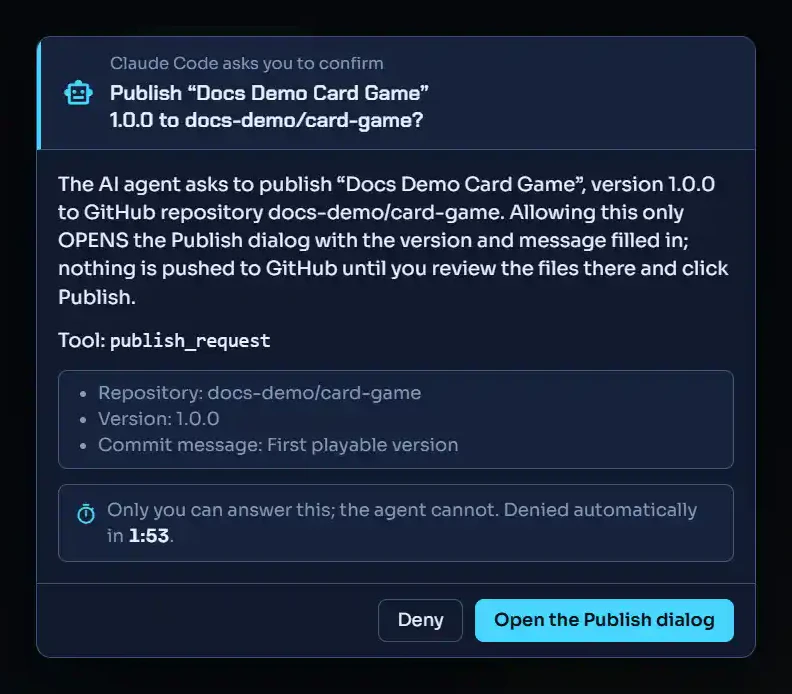 (open full size)
It is built so a click can't land on it by accident:
- Deny has the focus, so a stray Enter denies. Esc denies too.
- Allow stays off for a moment after the dialog opens.
- If nobody answers, it is denied after 120 seconds. A countdown shows the time left.
- There is never an "allow for this session". Every request is its own click.
If the agent asks again while a dialog is open, the new request waits in line. The dialog tells you how many are
waiting. The agent hears human-denied when you click Deny, and human-timeout when time runs out.
Some tools change class#
A few tools move up a class when their arguments make them riskier:
page_navigatebecomes D when it would discard unsaved work, and H when it would leave a live room.manifest_setbecomes H when it addsread-hidden-informationorplugin-call.table_resetis D in a preview and H in a live room.lobby_settings_setbecomes H when it changes visibility or the password.sync_resolvebecomes H when a choice throws away changes.
Two tools act on other tools: actions_invoke and page_call_tool. They take the class of whatever they call. A class
only ever moves up this way, never down.
What can an agent never do?#
Some things have no tool at all. These are your access keys and agent settings, your account, billing and store purchases. Friends and invites, reviews and ratings, favorites, admin pages and the Debug tab are on the list too. A test fails the build if a new control in those areas isn't marked out of the agent's reach. To change any of them, you use DiceyTable yourself.
Related#
- Watch, pause or stop your agent: see each call as it happens
- Disconnect, revoke or remove the agent: switch it off for a while or for good
- AI agent safety: every safeguard in one place