
Get started
Use one agent across several tabs
Pair one tab with a code, and your AI agent can work in more DiceyTable tabs. Previews join by themselves, and your own new tabs need one click.
On this page5 sections
You type a pairing code once per agent session. After that, more DiceyTable tabs can join the same session: a preview the agent opens joins by itself, and a tab you open yourself needs just one click.
So your agent can edit in one tab, play-test in another and watch the lobby in a third. This page shows how each kind of tab joins, how the agent picks a tab, and what keeps a tab paired. If you haven't paired your first tab yet, start with Pair a DiceyTable tab with your agent.
How each kind of tab joins#
A preview the agent opens joins by itself. When the agent starts a play-test with playtest_start, the editor
quietly hands the new preview tab a one-time pass. The preview joins the same session with no dialog, and the
Agent connected chip shows up there right away. It uses the options you picked for the editor tab. See
Play-test your game with an agent.
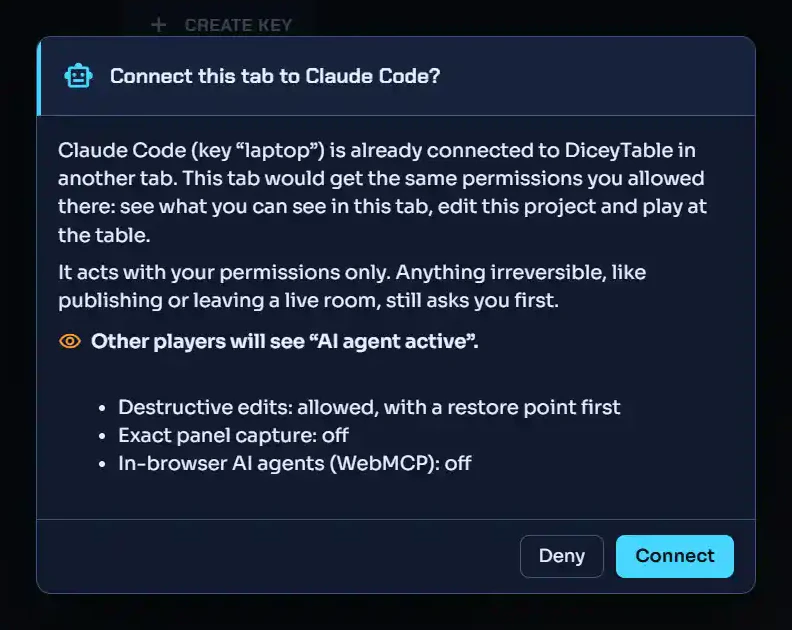
A tab you open yourself needs one click. Open Connect AI agent in it once. You already said yes to this agent, so you skip the code. The dialog asks Connect this tab to Claude Code? and shows the options it will use. Click Connect. Those are the options you chose for your first tab. If the bridge no longer knows them, the tab uses the careful ones instead: Ask me each time for destructive edits, no exact capture and no in-browser agents.
A tab the agent opens joins only if its opener vouches for it. The tab that opened it must confirm the hand-off. A link that claims a hand-off, with no open tab of yours to back it up, does nothing at all.
 (open full size)
Which tab gets the agent's call?#
The agent can name a tab on any page tool by passing tab with an id from
session_list_tabs. If it doesn't, the call goes to:
- the tab it picked with
session_select_tab, or else - the only paired tab that offers that tool.
If several tabs could take the call, it fails with ambiguous-tab, and the error lists them. The agent then passes
tab, or picks a default with session_select_tab. Diagnostics tools also take tab: "all", which reads every
paired tab at once.
Does a reload end the pairing?#
No. A tab remembers its pairing while you reload it or move to another page in the same tab. A page with no agent tools drops the chip, and coming back picks up again. It makes no difference who reloaded it: you, the browser waking a sleeping tab, or a new DiceyTable version. The tab comes back with a new tab id, in the same agent session. It shows no dialog and asks for no code.
A tab left in the background keeps its pairing too. A hidden or sleeping tab can miss its heartbeats, the small
"still here" messages it sends every 30 seconds. DiceyTable's server then closes that tab's connection. The tab
rejoins the moment it runs again, like a friend who steps out for snacks and slides back into the game. In between,
the agent may see a few calls fail with not-attached. You don't need a new code.
A new code is needed only when the session really ended. That happens when the agent disconnected, you clicked Disconnect, your AI app or the bridge restarted, or the key stopped working. A new bridge always means a new session. Fix pairing code problems walks through each case.
Can two agents share one tab?#
No. Each tab works for one agent at a time. Say a second agent, from another AI app with its own bridge, asks for a tab
that's already paired. The tab asks Switch this tab from Claude Code to Cursor? To accept, type the
second agent's pairing code. To decline, click Deny, and the second agent gets human-denied. A tab never
switches on its own.
Good to know. Closing a tab detaches only that tab. The session and its other tabs carry on. To end everything at once, use Disconnect on the chip. See Watch, pause or stop your agent.
Next steps#
- Check your agent is connected:
session_list_tabsshows every tab and who it belongs to. - In-browser AI agents (WebMCP): let your browser's own agent use a paired tab.